Graphing Calculators · Volume 8
Programming the TI-84 Plus CE
Every TI graphing calculator since the TI-81 can be programmed. The built-in language is TI-BASIC, typed on the calculator itself. Beneath it, for those who found the way in, was the processor’s own machine code, and around that grew one of the longest-lived communities of amateur programmers, with its own websites, its own tools and, in 2009 and again in 2020, its own disputes with Texas Instruments.
8.1 A first program
TI’s programming guide for the CE starts with a program called CYLINDER, which works out a cylinder’s volume from its radius and height:
PROGRAM:CYLINDER
:Prompt R,H
:πR²H→V
:Disp "VOLUME IS",V
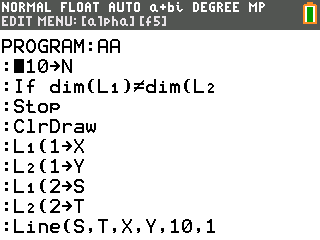
To write it: PRGM ► ► (NEW) 1 (Create New), and type the name, up to eight characters beginning with a letter (the calculator is already in ALPHA lock). The commands are pasted from menus, not typed letter by letter: Prompt from PRGM ► (I/O) 2, Disp from the same menu, π from 2nd π, and the arrow → with STO→. To run it, press PRGM, choose CYLINDER and press ENTER. Given a radius of 1.5 and a height of 3, it prints the volume, as TI says, “to 8 decimal places as 21.20575041 cubic cm” (pp. 2–6).
8.2 Tokens
The commands are pasted from menus because a TI-BASIC program is not stored as text. Each command, function and symbol is a token of one or two bytes: Prompt is the single byte DDh, Disp is DEh, π is ACh and the end of each line is 3Fh. Letters and digits have one byte each, and the colons at the start of each line are not stored at all. So CYLINDER, 34 characters on the screen, takes 26 bytes in memory.
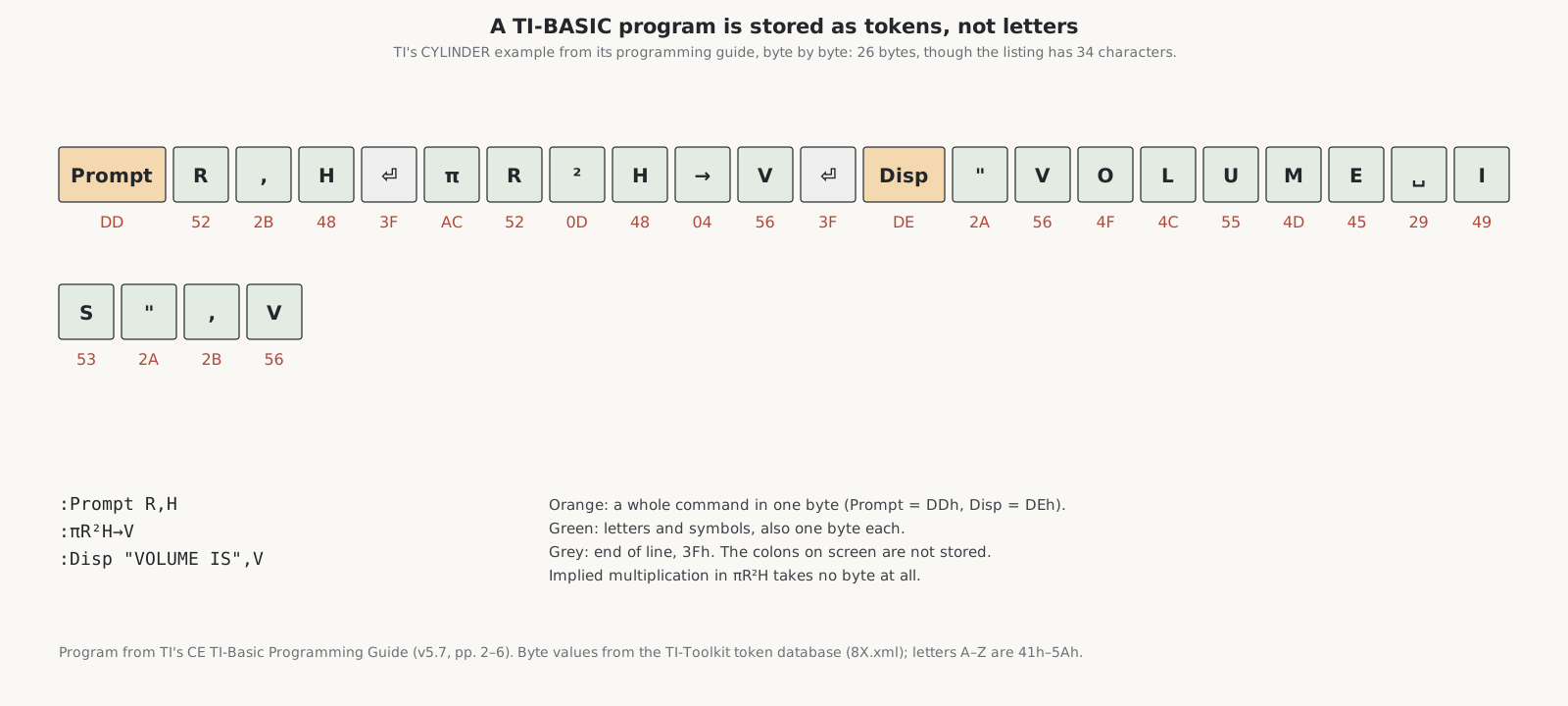
There are more than 256 tokens, so the less common ones take two bytes: the first byte, such as 5Ch for matrices, 5Dh for lists, 5Eh for the Y= equations or BBh for a large miscellaneous group, says which table the second byte indexes, and the TI-84 Plus added a further table, EFh, for its new commands. Lower-case letters, rarely used, take two bytes each. A program is interpreted, token by token, each time it runs.
8.3 RAM, archive and garbage
A program or variable lives either in RAM, where it can be edited and run, or in the archive, the flash memory, where it is safe from a crash or a flat battery. Since CE operating system 5.3 an archived program can be run directly; before that it had to be copied back to RAM. The archive is divided into sectors, and an archived variable must sit in one sector, so as variables are archived and deleted the archive fills with gaps. When it runs out of room, the calculator garbage-collects: it deletes the copies marked for removal and moves the rest together. TI’s guidebook warns that this “may take up to 20 minutes”, and that “power loss during garbage collection may cause all memory (RAM and Archive) to be deleted”.
8.4 Machine code and the community
The way in to machine code was found, not given. On the TI-82 of 1993, users discovered that assembly-language programs could be made to run, which TI had not intended. The TI-83 of 1996 had a hidden command for running them, Send(9prgm, and later models an official one, Asm(. With machine code came games far beyond TI-BASIC: Patrick Davidson’s shoot-‘em-up Phoenix, released with its source code for the TI-82, 83, 85, 86 and their successors, was downloaded more than 228,000 times from one site alone; Drug Wars, a trading game first written for a TRS-80, became, in GamesRadar’s phrase, “the quintessential TI-83 experience”. The websites the programmers built have lasted: ticalc.org opened on 21 June 1996, Cemetech in 2000 and Omnimaga on 1 September 2001.
The TI-83 Plus of 1999 brought flash memory, operating-system updates and applications, all of which had to carry TI’s digital signature before the calculator would accept them; the operating systems were signed with a 512-bit RSA key. In July 2009 Benjamin Moody published the factors of the key that signed the TI-83 Plus’s operating systems, which he had found with free number-field-sieve software in 73 days on a single dual-core PC. Volunteers using distributed computing factored the keys for the TI-84 Plus, TI-89, TI-92 Plus and Voyage 200 soon afterwards. TI sent takedown notices under the Digital Millennium Copyright Act to the people and sites that published them; the Electronic Frontier Foundation took up three of their cases, and its letter of 13 October 2009 argued that publishing the keys broke no law. TI let the matter drop.
8.5 The CE, assembly and C
The TI-84 Plus CE ran machine code from the start. Its eZ80 has a Z80 compatibility mode, but a TI-84 Plus machine-code program, TI’s guide says, “transfers to the TI-84 Plus CE but fails upon execution”: CE programs, marked by an Asm84CEPrgm token on their first line, are written for the eZ80’s own 24-bit mode, and TI’s programming guide of 2016 explained how to run them with Asm( (p. 57). The community wrote a C compiler for it: the CE C/C++ Toolchain, built on a version of the LLVM compiler with an eZ80 back end and the fasmg assembler, which turns C into calculator programs.
In 2020 TI took the ability away. Operating system 5.5.1 for the French TI-83 Premium CE, released on 20 May 2020, removed the ability to run assembly and C programs and could not be downgraded; for the TI-84 Plus CE in the United States the change came with OS 5.5.5 and later. TI said it made the decision “to prioritize learning and minimize any security risks”; Wikipedia links it to a video showing how to get round Press-to-Test on OS 5.2.2. Cemetech’s Christopher Mitchell argued that it cut off the path by which students went on from TI-BASIC to real programming.
The community answered with a jailbreak. arTIfiCE, by a programmer called YvanTT, was released on 6 September 2020; it “exploits a bug in the CabriJr app to gain code execution”. TI closed that bug in OS 5.8.3; arTIfiCE 2.0, in August 2025, found another way in, and was in turn blocked in 5.8.5, which a third version targeted in September 2026.
My own CE’s About screen shows operating system 5.8.5.0074, the version that blocked arTIfiCE 2.0.
8.6 Python
On the TI-84 Plus CE Python and its European twins, PRGM also opens the Python app. It has three parts, a file manager, an editor and a shell with the familiar >>> prompt, and it runs on the separate ARM co-processor described in volume 5, not on the eZ80. TI’s guide explains that “TI-Python is based on CircuitPython, a variant of Python 3 for teaching coding. It was developed by Adafruit and adapted for use by TI.” Python programs are stored as special variables, PY AppVars, up to “a maximum of 100 Python programs … or 50K of memory”; floating-point numbers are shown to 16 significant digits, unlike the 14 of the calculator’s own arithmetic. TI’s modules include ti_plotlib for graphs, ti_system for exchanging data with the calculator’s lists and regressions, and modules for TI’s robot and sensor accessories. Wikipedia’s verdict is that its Python is “very slow” next to the NumWorks’s and the HP Prime’s. My TI-84 Plus CE is the plain model, without the Python app.
Sources
- TI, CE TI-Basic Programming Guide (v5.7), pp. 2–6; TI-Basic Programming Guide for the TI-84 Plus CE (2016), p. 57; Python Programming for the TI-84 Plus CE Python (5.7); Getting Started with the TI-84 Plus CE Python, p. 63; TI-84 Plus C Silver Edition Guidebook, pp. 336–338 (garbage collection); Getting Started with the TI-84 Plus CE (OS 5.3) (archived programs).
- TI-Toolkit token database (github.com/TI-Toolkit/tokens,
8X.xml); Cemetech’s TI-BASIC reference on tokens. - For the TI-83 Plus’s machine code: TI’s TI-83 Plus Developer Guide and System Routines (2002).
- Wikipedia, “TI-82”, “TI-83 series”, “Drug Wars (video game)”, “Texas Instruments signing key controversy” and “TI-84 Plus CE series”; ticalc.org’s history page and archive; GamesRadar.
- Cemetech news: “TI Removes ASM/C Programming from TI-83 Premium CE” (May 2020), “arTIfiCE Restores CE Native Code, For Now” (September 2020), “arTIfiCE v2.0 Released” (August 2025); the CE C/C++ Toolchain documentation (ce-programming.github.io).
Comments (0)