Graphing Calculators · Volume 5
Inside the TI-84 Plus CE
Texas Instruments publishes no technical description of the TI-84 Plus CE’s insides: no block diagram, no chip list, no memory map. What is known comes from the calculator’s users, who have read its ports, dumped its memory and written an emulator that runs its real operating system. Their documentation, chiefly the WikiTI wiki and the source code of the CEmu emulator, is detailed and consistent, and it is the source of most of this volume. Where it rests on inference, the text says so.
5.1 The family tree
The CE is the last of a line of Z80 machines that runs back to the TI-81. For twenty-five years TI kept the processor family and the operating system’s design, and raised the clock and the memory:
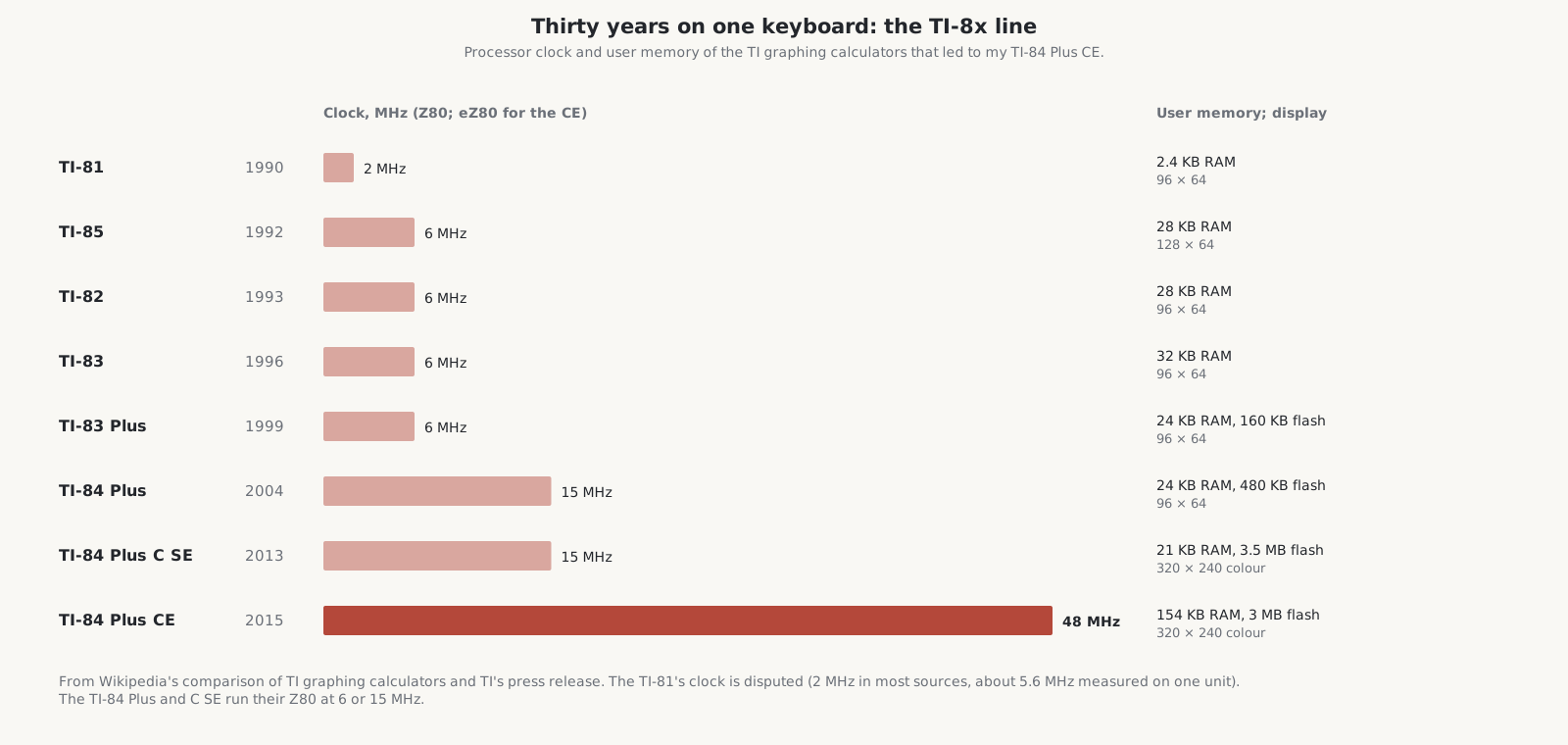
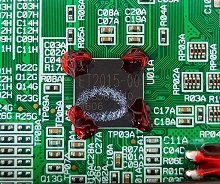
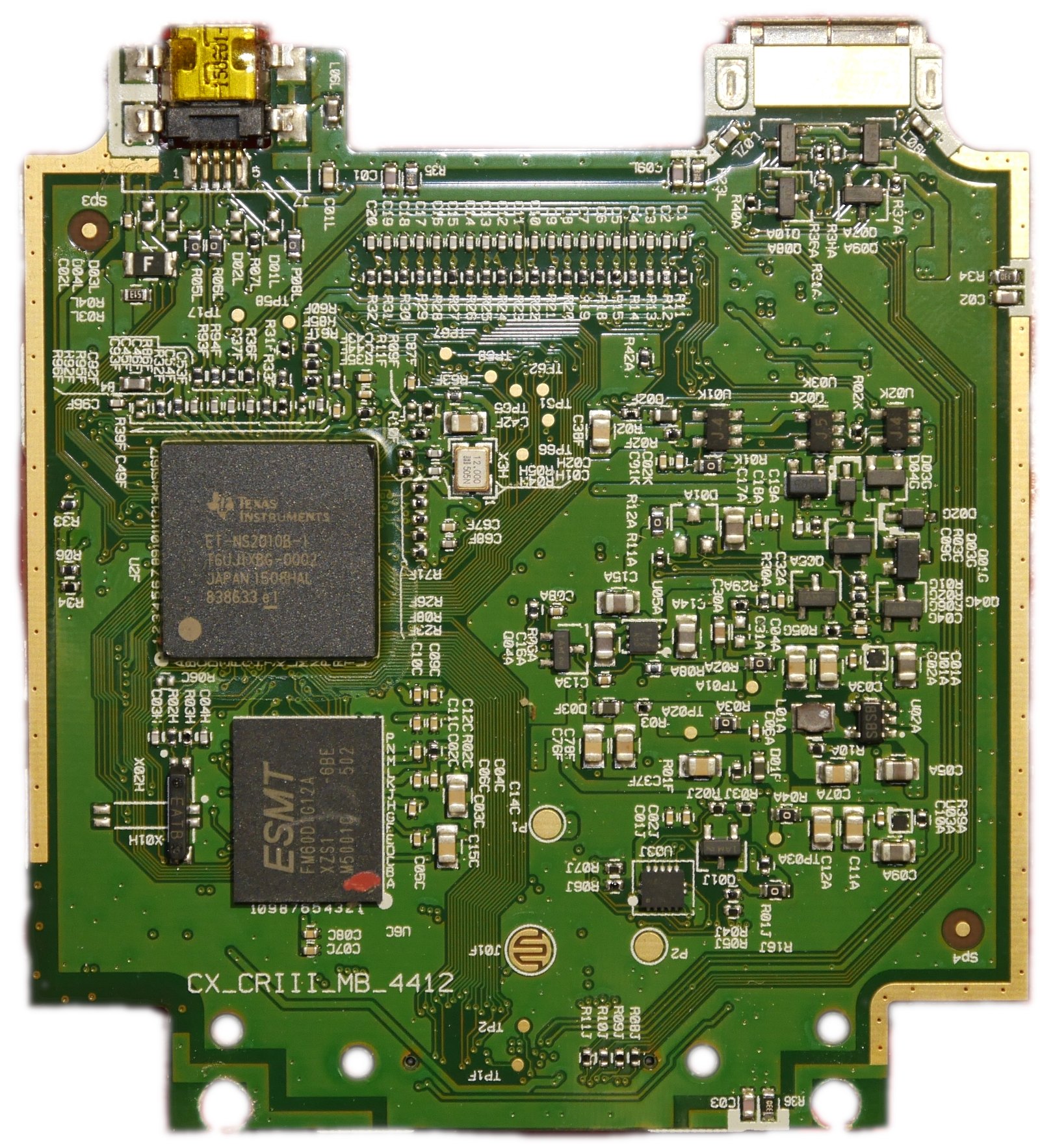
The Z80 was Zilog’s 8-bit processor of 1976. The eZ80, which Zilog introduced in 2001, runs the same programs but has a pipeline that overlaps fetching, decoding and executing instructions, extends the registers from 16 to 24 bits, and can address 16 MB directly. Zilog’s manual claims it is “capable of executing code four times faster than a standard Z80 operating at the same clock speed”; Wikipedia says “almost three times”. In the CE, the eZ80 is not a separate chip but a core inside a TI chip, an application-specific integrated circuit (ASIC), together with the memory controllers and the other devices.
5.2 The chip and its neighbours
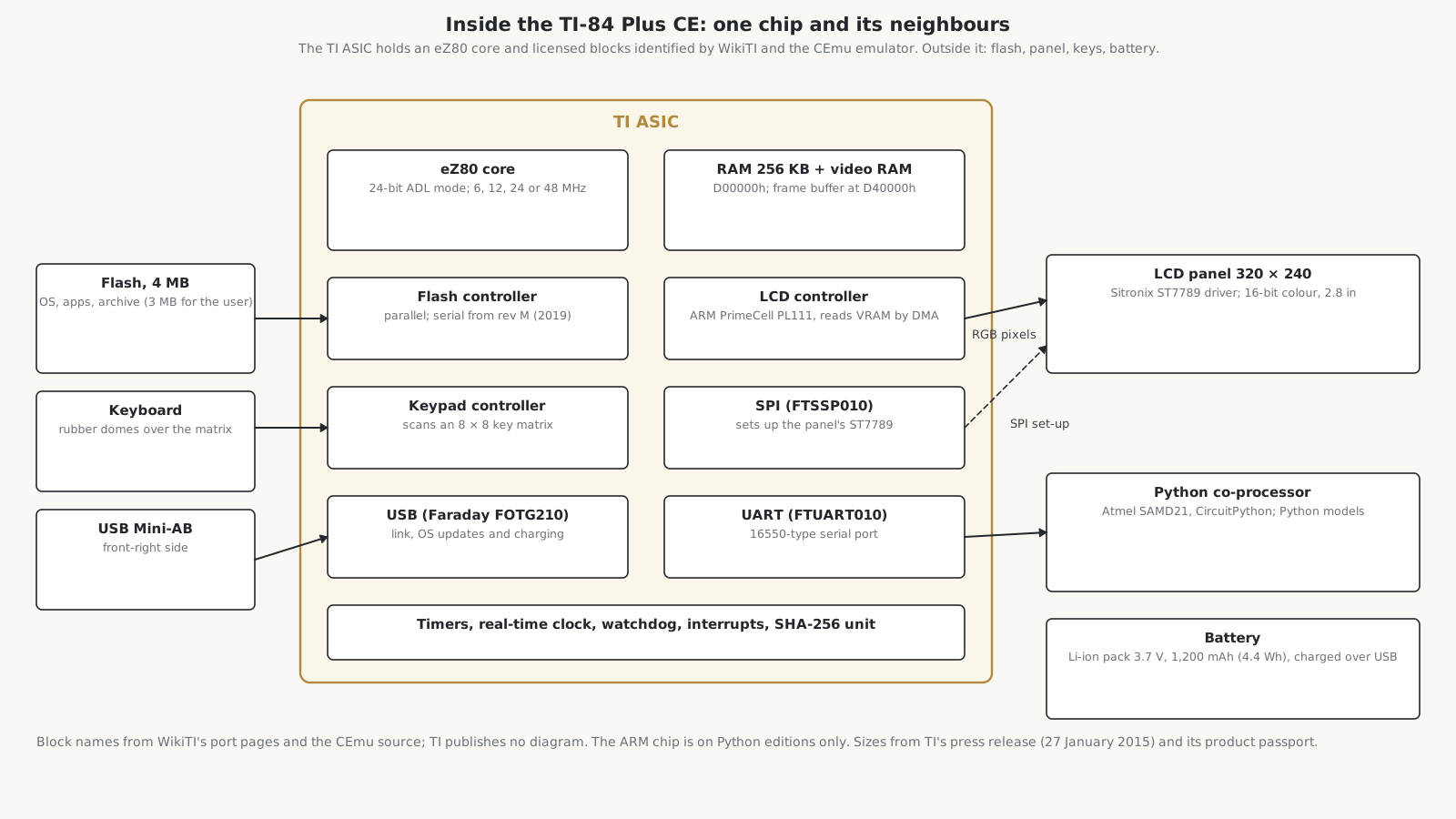
WikiTI identifies several of the blocks in the ASIC as standard designs that TI licensed: an ARM PrimeCell PL111 colour LCD controller, a Faraday FOTG210 USB controller, and Faraday-type serial (SPI) and UART controllers. The rest is TI’s own: timers, a real-time clock, a watchdog, interrupt and keypad controllers, a flash controller and even a SHA-256 hashing unit. A port register selects the eZ80’s clock: 6, 12, 24 or 48 MHz.
The clock is not the whole story. In hand-written assembly, forum members who have measured it say, the 48 MHz eZ80 “can’t even manage twice the MIPS” of the 15 MHz Z80 in the TI-84 Plus C, because “TI chose slow RAM and slower Flash”, and the CPU waits for them. The CE’s real advantage over its predecessor is not raw speed but the way it handles the screen.
5.3 Memory
The eZ80 in the CE runs in its 24-bit ADL mode (“address and data long”), in which it sees a flat 16 MB address space with no paging. The operating system arranges it like this:
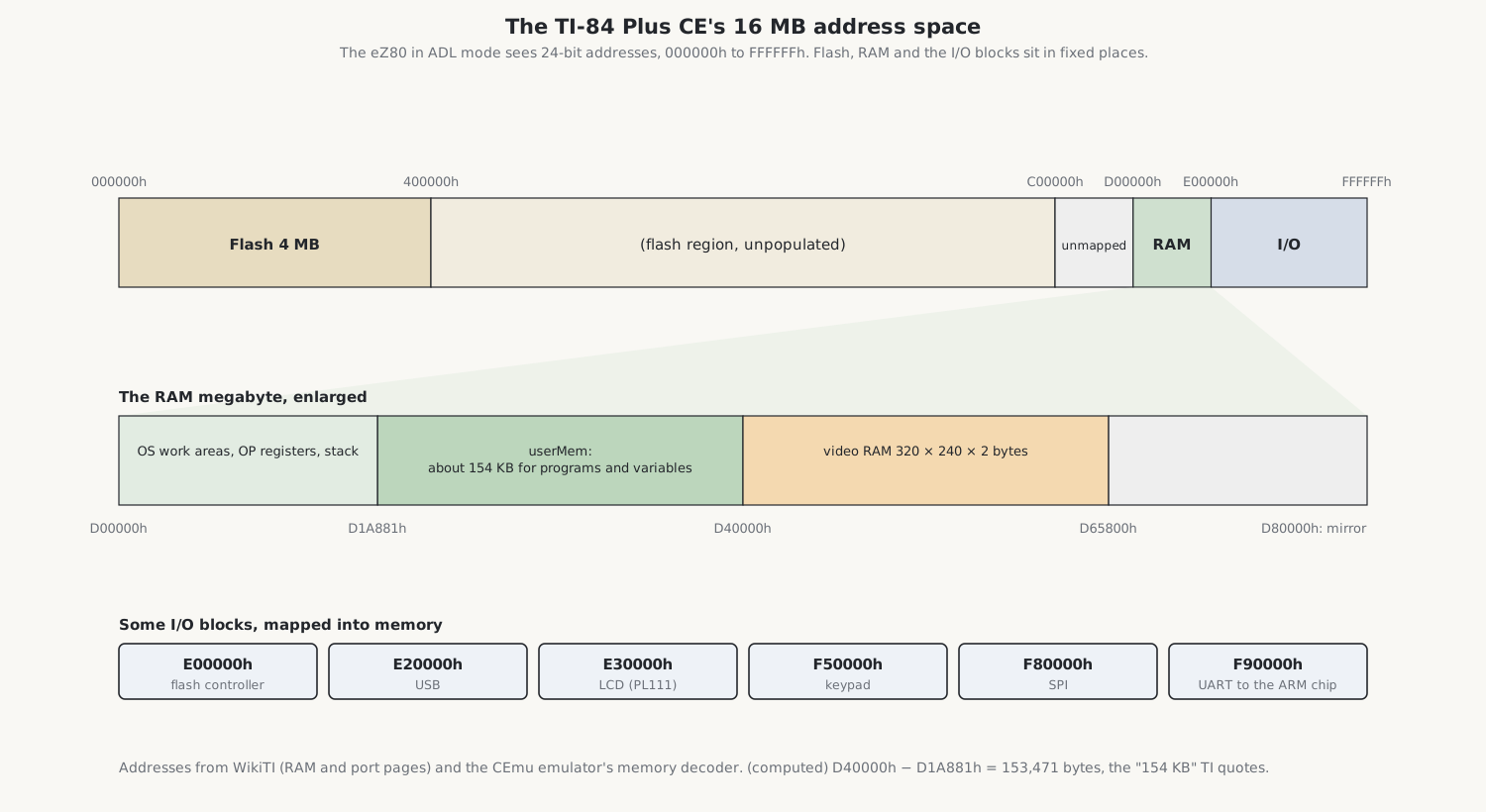
- Flash starts at address 0: 4 MB, holding the boot code, the operating system, applications and the user’s archive, of which 3 MB is free for the user. It is divided into sectors of 64 KB, which matters for the archive (volume 6).
- RAM starts at D00000h: 256 KB for the operating system and the user, plus 150 KB more used as the screen’s memory. The user’s area, userMem, runs from D1A881h up to the video memory at D40000h, 153,471 bytes, which is TI’s “154 KB” if a kilobyte is a thousand bytes.
- Video RAM begins at D40000h: 320 × 240 pixels at two bytes a pixel, 153,600 bytes.
- Input and output devices appear as memory from E00000h upwards: the flash controller at E00000h, USB at E20000h, the LCD controller at E30000h, the keypad at F50000h, the serial controller at F80000h and the UART at F90000h.
Writes to protected areas of the flash from unprivileged code raise an interrupt instead of taking effect.
5.4 The display chain
The screen is where the CE most differs from the TI-84 Plus C Silver Edition before it. That calculator had no frame buffer: its 15 MHz Z80 had to send every pixel to the display’s own controller through an input-output port, two or three writes and at least 29 clock cycles a pixel, which limited a full redraw to about seven a second.
The CE has two display controllers in series. The PL111 inside the ASIC reads the 153,600-byte frame from the video RAM by itself, without the processor, and streams it over a parallel RGB interface to a Sitronix ST7789 controller on the panel, which drives the liquid crystal. The ST7789 is set up through the serial (SPI) controller. The operating system uses 16-bit colour, five bits of red, six of green and five of blue for each pixel, but the PL111 can also show 1, 2, 4 or 8 bits a pixel through a palette; 8 bits halves the memory a frame needs, though TI’s operating system cannot work in that mode. The panel itself is 2.8 in diagonally, 320 × 240 pixels at 140 dots to the inch. Who made it is uncertain: one forum lead points to a GiantPlus module, but it has not been confirmed.
5.5 The keyboard
The keys press through a membrane onto the main board, where they are wired as a matrix of rows and columns. The keypad controller at F50000h scans the matrix by itself, once or continuously, with programmable waits between rows, and leaves the state of each row in a register; it can also raise an interrupt as soon as any key is pressed. CEmu models eight rows and eight columns, and the ON key separately, because it must be able to wake the calculator. CEmu even models the “ghosting” of a simple key matrix when several keys are held at once.
5.6 Flash, revisions and USB
The ASIC’s flash controller can drive either a parallel flash chip or a serial one. WikiTI says the serial interface is “only used in HW revisions M and later”, from about May 2019, and that all Python editions are revision M or later. CEmu distinguishes three generations of the ASIC, which it calls pre-A, I and M, while users read revision letters, such as L, off their circuit boards and serial codes; the two schemes are probably not the same thing. CEmu answers the operating system’s queries as if the parallel flash were a Winbond W29GL032C, which suggests, without proving, the original part.
The USB port is a mini-AB socket that can act as either end of a link: to a computer, for TI Connect CE and operating-system updates, or to another calculator, for sending files. It also charges the battery.
5.7 The battery
TI’s digital product passport for the TI-84 Plus CE Python, whose battery is the CE’s, describes it as a “Lithium Prismatic Pack - 3.7L1200SPB - 3.7V 1200mAh 4.4Wh”, weighing 25 g and made by Tianjin Lishen Juyuan New Energy Technology; it gives the chemistry both as lithium ion and as lithium polymer. iFixit calls it lithium polymer and rates it at about 30 hours of continuous use at full brightness, and TI and its resellers promise “up to one month” of ordinary use. It charges in about four hours, and the calculator works normally while it charges. Volume 9 covers replacing it.
5.8 The Python co-processor
The CE’s eZ80 could not run Python, so TI added a second processor. On the TI-84 Plus CE Python and its European and French twins, an Atmel SAMD21 microcontroller, an ARM Cortex-M0+ with 256 KB of flash and 32 KB of RAM, runs CircuitPython, and the eZ80 talks to it through the ASIC’s UART, a serial port compatible with the 16550 standard. Wikipedia gives the speed as 115,200 baud. Cemetech’s report of the announcement in 2020 said the chips would talk “over SPI”; WikiTI documents the UART as the link, and notes that the SPI controller can also reach the ARM chip on Python models, which may explain the difference. The plain CE, like mine, has no co-processor.
5.9 For comparison
Two other designs show how differently the same job has been done.
The HP 48 series used HP’s own Saturn processor: it handled data four bits at a time, but its working registers were 64 bits wide, enough for a whole floating-point number. The HP 48SX of 1990 ran it at 2 MHz in a chip called Clarke. Its screen was simply an area of RAM, so the calculator could keep separate pages for graphics and the stack.
The TI-Nspire CX, TI’s other platform, uses an ARM processor at 132 MHz and an operating system of its own.
Sources
- WikiTI (wikiti.brandonw.net): the TI-84 Plus CE port pages (flash controller 1000, USB 3000, LCD 4000, keypad A000, SPI D000, UART E000) and RAM map.
- CEmu, the CE-Programming emulator (github.com/CE-Programming/CEmu):
mem.c,mem.h,control.c,lcd.c,panel.c,keypad.c,asic.c. - Zilog, eZ80 CPU User Manual (UM0077); Wikipedia, “Zilog eZ80”, “TI-84 Plus CE series”, “TI-84 Plus series” and “HP 48 series”.
- Cemetech forum and news: the TI-84 Plus C SE’s display (2013), eZ80 speed (2015), the panel (2015–19), board revisions (2019–20), the Python adapter (2019–20).
- TI, digital product passport for the TI-84 Plus CE Python; TI’s press release of 27 January 2015; Getting Started with the TI-84 Plus CE, pp. 68–69; iFixit, TI-84 Plus CE device page and teardown.
Comments (0)