Calculator Watches · Volume 7
Care and Repair
A Data Bank asks for little: a new cell every few years, a dry wrist and a gentle cloth. What it cannot do is shrug off water, and what it will not do is keep its memory through a battery change. Both points come from what is, and is not, printed on its case back.
7.1 What the case back says
The engraving on the back of my watch reads, line by line:
TELEMEMO 25 · 5 MULTI-FUNCTION ALARM · CALCULATOR · DUAL TIME CASIO · [2888] DBC-32 · STAINLESS STEEL BACK · MADE IN CHINA · DH ⟨13 LANGUAGES⟩ ENG/POR/ESP/FRA/NED/DAN/DEU/ITA/SVE/POL/ROM/TÜR/RUS
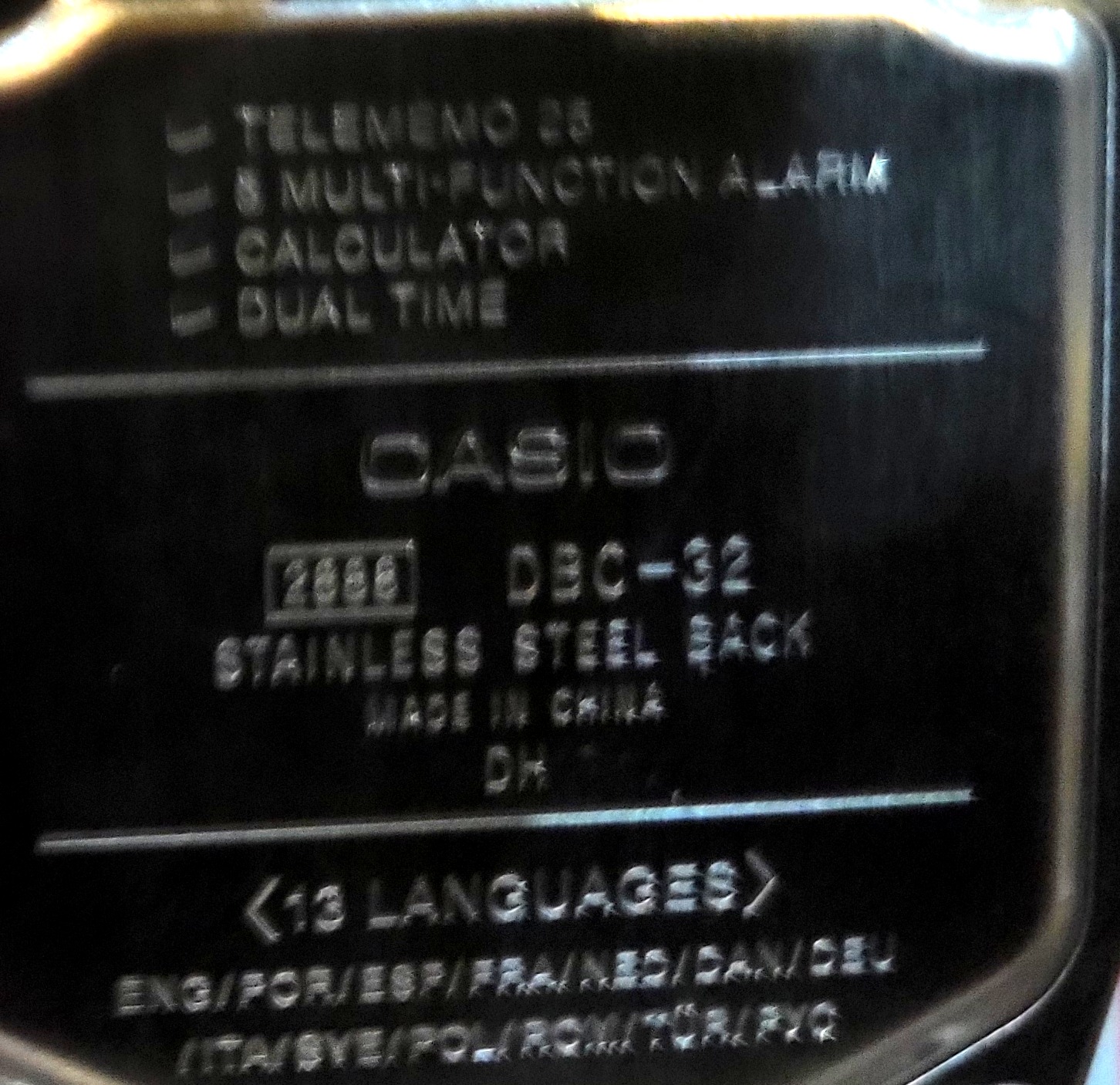
The number in the box, 2888, is the module: the movement and its electronics, which Casio uses in several models and which names the operation guide (qw2888). DBC-32 is the model, the case and its styling. “DH” also appears on other Casios made in China; nobody has published what it means, and Casio’s backs carry no date code that collectors have decoded.
What the back does not say matters as much. There is no WATER RESIST marking, on the back or on the face. Casio’s general precautions are plain about that: “Watches that do not have WATER RESIST or WATER RESISTANT marked on the back cover are not protected against the effects of sweat,” and should not be exposed to “large amounts of sweat or moisture, or to direct splashing with water”. Some retailers list the DBC-32 as water resistant to 30 m or 50 m; the case back, which is Casio’s own statement about the watch in hand, says otherwise, and the collector who compiled the fullest history of the Data Bank line knew of only one series of the DBC models, some later DBC-61s, ever marked water resistant. So a watch like mine should come off for hand-washing and stay indoors in the rain.
7.2 The battery
The face says 10 Year Battery. Casio’s guide for module 2888 gives no battery specification, but Casio’s product page gives a CR2025 lithium cell and a life of about ten years, and its parts list sells the cell as part 71111927. Casio’s guides for other ten-year modules state the assumptions behind the figure: one 10-second alarm and one 1.5-second light a day. Use the light more, or let the auto light switch fire all day, and the cell will not last ten years; the guide says outright that “frequent use of illumination shortens the battery life” (p. 4). Volume 5 works through the arithmetic.
7.2.1 Before changing it: write down the Data Bank
The 25 Data Bank records live in the chip’s RAM, which holds them only while it has power. Casio’s guide does not say whether they survive a battery change, and neither the back nor the face of my watch carries the Memory Protect wording of the Data Banks, from the DBM-150 of 1994 onward, that kept their records in EEPROM. The safe course is to assume that a new battery means an empty Data Bank, and to copy the names and numbers onto paper first. The time, the date, the language and the alarms will certainly need setting again: the guide says the date need never be changed “except after you have the watch’s battery replaced” (p. 4).
7.2.2 Changing it
Casio’s own advice is that a battery change “requires the use of special tools” and should be done by a retailer or an authorized service centre, which will check the seal at the same time. For anyone doing it at home, the job on this watch is straightforward, but slow and careful:
- Copy the Data Bank records and the alarm settings.
- Lay the watch face down on a soft cloth and remove the four small cross-head screws at the corners of the back.
- Lift the back straight off. Note the rubber O-ring in its groove, and any spring contact on the inside of the back, which may belong to the buzzer.
- Release the cell from its clip, noting which way up it sits, and fit a new CR2025 the same way, + side as marked.
- If the display stays blank or shows nonsense, the chip needs an all clear: on Casio modules a contact marked AC is touched to the + side of the cell with metal tweezers for a moment. Its place on module 2888 has not been published; it is usually marked on the battery hold-down plate. Touching anything else with the tweezers can do harm.
- Check the O-ring for cracks or flattening, give it the thinnest smear of silicone grease, and seat it evenly.
- Refit the back and tighten the screws a little at a time, in opposite corners.
- Set the time, date and language (volume 6), then re-enter the Data Bank.
Casio lists the back O-ring for the DBC-32 (part 10169196) as a restricted part, sold to service centres only, and advises replacing a watch’s gaskets “about once every two or three years” to keep water resistance. Since this watch has none to keep, the O-ring’s job is to keep out dust and damp air.
7.3 The display
An LCD is a sandwich of glass, liquid crystal and polarizing film, and heat is its enemy. Casio warns that leaving a watch above 60 °C for long periods “can lead to problems with its LCD”, such as a dashboard in summer, and that any LCD becomes hard to read below 0 °C and above 40 °C; the second is temporary, the first may not be. Faults on old watch displays fall into a few kinds:
- Faint or slow digits in the cold: the liquid crystal grows sluggish. It recovers when warm.
- A dark, inky patch: the seal between the two glass plates has failed and the liquid crystal is leaking, or the polarizer film has lifted from the glass after overheating. A lifted polarizer can be replaced with new film; a leaking cell means a new display or a new module.
- Missing segments or a missing row: usually the elastomeric “zebra” strip between the glass and the circuit board, dirty or shifted. Cleaning the contacts and reseating the strip is the first thing to try.
- Fogging inside the crystal: brief fogging after a sudden cold is normal; fog that stays means damp inside, and on a watch with no water resistance that needs the back off and a slow, warm dry.
7.4 The keypad
The sixteen keys press through the case onto contacts on the module (volume 4). Before suspecting a fault, two things that look like one: the keypad does nothing while the display is lit, and a watch set to MUTE gives no beep (volume 6). Real faults are usually dirt or wear at the contacts. One owner of a Casio CA-53W, a close relative, found that sanding the contacts “seemed to make things worse”: the contacts are thin printed films, and abrasives remove them. The keys of the old Data Banks of the 1980s had a printed membrane that fingernails could wear through; the later separate rubber keys are much more durable.
7.5 The crystal
The crystal of the DBC-32 is resin, a clear plastic, not mineral glass. That makes it easy to scratch and easy to polish: a plastic polish such as Polywatch, rubbed in with a soft cloth, removes fine scratches. Polywatch’s makers warn that it is “designed exclusively for acrylic and other plastic watch crystals”; it does nothing for mineral glass. Deep gouges need a new crystal, which Casio does not list as a spare part for this model.
7.6 Bracelet and cleaning
Casio lists the steel bracelet of the DBC-32D (part 10212051) and the spring bars that hold it (72011783) as spares. Steel bracelets of this kind are usually shortened by pushing out pins in the direction of an arrow stamped inside the links; look for the arrows before pushing, and use a proper pin pusher.
For cleaning, Casio’s precautions warn against “thinner, gasoline, solvents, oils, or fats”, and cleaners or cosmetics containing them, which can discolour or damage the resin case. For a watch with no water resistance the only safe cleaning is a cloth barely damp with water, and a soft brush for the bracelet, dried at once.
7.7 When it cannot be fixed
Casio sells the DBC-32’s cell, O-ring, strap and bracelet, but no module 2888 on its own, and none turns up for sale separately. A new DBC-32 costs less than most repairs (volume 8), and a used one is the practical source of a spare module. The DBC-611 of 2011, with module 3228, does everything the 2888 does in a different case.
Sources
- Casio, Operation Guide 2888 (MO0407-EA, 2004), pp. 1–5.
- Casio, Watch Operation Guide 3563 (MA2404-EA, 2024), general precautions on water resistance, batteries, the LCD, bands and cleaning, pp. 1–2.
- Casio parts lists for the DBC-32-1A and DBC-32D-1A (casiopart.com); Casio India, DBC-32-1A product page.
- lookatwrist, “Casio Data Bank” history thread, WatchUSeek, August 2020: water-resistant DBC-61s, Memory Protect, keypad durability.
- Core Electronics forum, “Casio DBX-100 repair attempt” (2023); iFixit Answers on the CA-53W keypad; Polywatch’s product description.
Comments (0)