Calculator Watches · Volume 6
Operating the DBC-32
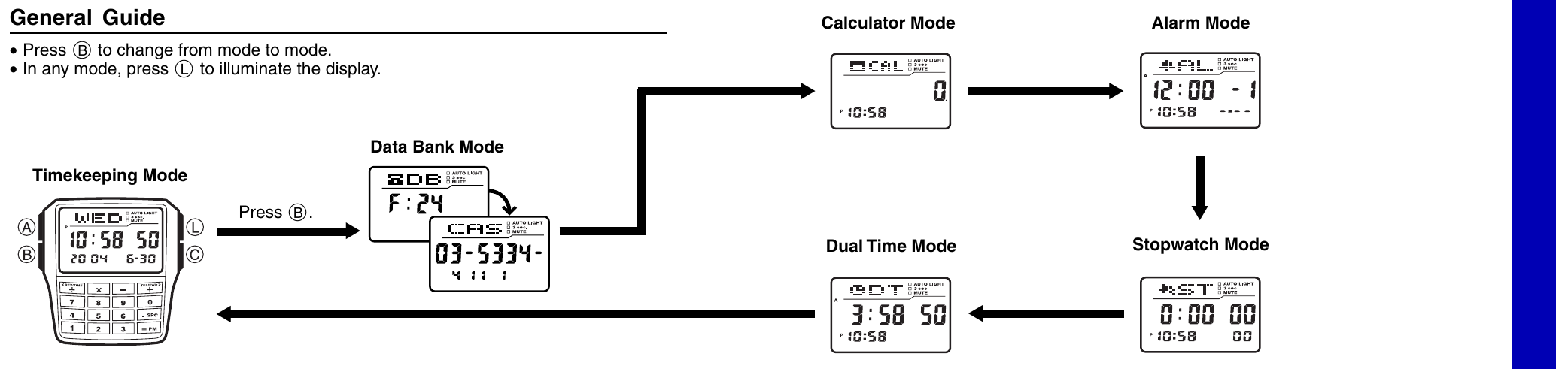
Everything in this volume comes from Casio’s five-page Operation Guide 2888 (document MO0407-EA, dated July 2004), which covers every watch built on module 2888, mine among them. The guide is in the Reference Library. Page numbers below are the guide’s.
6.1 The controls
The watch has four buttons on the face, two each side of the display, and a keypad of sixteen keys below it. Casio’s guide names the buttons by letter:
Table 1 — The watch has four buttons on the face, two each side of the display, and a keypad of sixteen keys below it. Casio's guide names the buttons by letter
| Button | Where | Printed on the face | Main jobs |
|---|---|---|---|
| A | upper left | ADJUST | enter and leave setting and input screens |
| B | lower left | MODE | change mode; move the cursor left |
| L | upper right | LIGHT | light the display |
| C | lower right | AC, 12/24H | clear in the calculator; 12/24-hour; start and stop; move the cursor right |
Keypad keys are written in brackets, as in the guide. The top row is [÷] [×] [–] [+]; [÷] and [+] double as the scroll keys, marked <REV/TIME and TEL/FWD> on the face. Below them come [7] [8] [9] [0], [4] [5] [6] [.SPC] and [1] [2] [3] [=PM]. The [.SPC] key is the decimal point in the calculator and a space in the Data Bank; [=PM] is the equals key and, while the time is being set, the AM/PM switch.
6.2 Six modes
Pressing B steps round six modes: Timekeeping, Data Bank, Calculator, Alarm, Stopwatch and Dual Time, then back to Timekeeping (p. 1). Pressing L lights the display in any mode.
The watch goes back to Timekeeping by itself if left alone for two or three minutes in the Data Bank or Alarm Mode, or six or seven minutes in the Calculator Mode; a setting screen left alone for two or three minutes is abandoned (p. 4). After any button or key has been pressed in a mode, one press of B returns straight to Timekeeping.
6.3 Setting the time, the date and the language
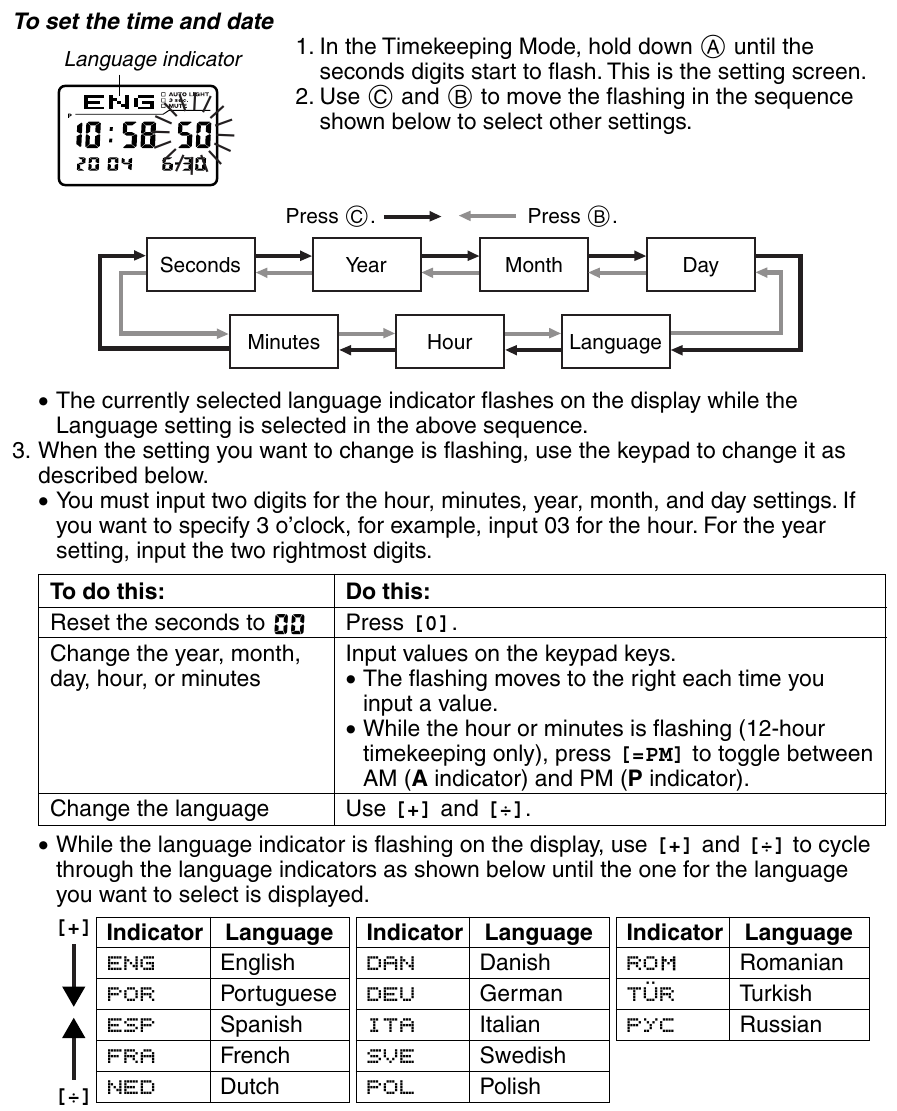
The timekeeping screen shows the day of the week in letters, the time with seconds, and the year and date below.
- In Timekeeping, hold A until the seconds flash. This is the setting screen.
- C moves the flashing on, and B moves it back, round seven settings: seconds, year, month, day, language, hour, minutes.
- With the seconds flashing, [0] resets them to 00. If the count was between 30 and 59, the minutes go up by one (p. 4).
- For the year, month, day, hour and minutes, type the value on the keypad, always two digits: 03 for three o’clock, and the last two digits of the year. The flashing moves on by itself after each digit.
- With the language flashing, [+] and [÷] step through the thirteen languages.
- Press A to finish.
The year can be set from 2000 to 2099, and the calendar allows for the lengths of the months and for leap years, so the date need never be set again “except after you have the watch’s battery replaced” (p. 4). The day of the week is worked out from the date.
In Timekeeping, C toggles between 12-hour time, with an A or P on the display, and 24-hour time. Holding C for about two seconds switches daylight saving time on and off, shown by DST (p. 1).
6.4 Thirteen languages
The language setting does two things: it chooses the language of the day of the week, and it chooses the letters that can be typed into Data Bank names. The thirteen are English (ENG), Portuguese (POR), Spanish (ESP), French (FRA), Dutch (NED), Danish (DAN), German (DEU), Italian (ITA), Swedish (SVE), Polish (POL), Romanian (ROM), Turkish (TÜR) and Russian, shown in Cyrillic as РУС (p. 1). Holding A in Timekeeping briefly shows the current language; holding it for a second goes on into the setting screen.
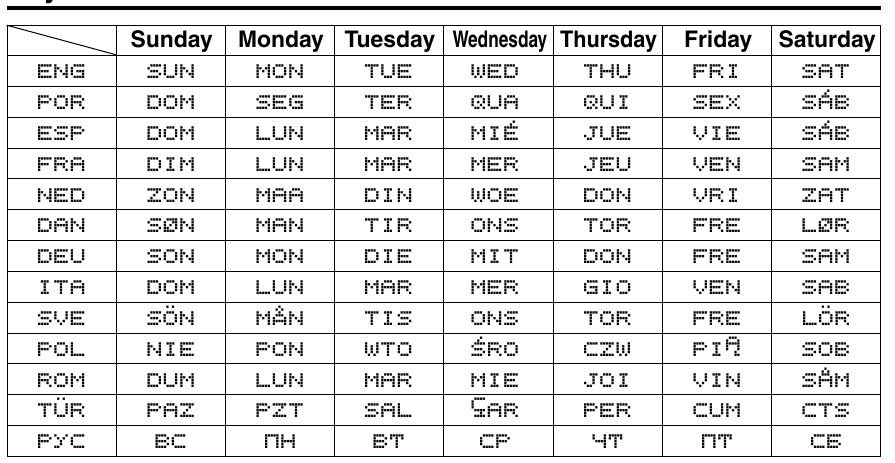
Each language has its own character set for names. English has the space, A to Z, and the symbols and digits; Portuguese, Spanish, French, Italian, Polish, Romanian and Turkish add their accented letters; Danish adds Æ, Ø and Å, and Swedish Å, Ä and Ö; Russian has the Cyrillic alphabet (p. 5). The guide’s sort table puts all 121 characters in one order, each accented letter beside its plain one, with the Cyrillic letters as characters 71 to 102, so that names in any language sort sensibly. Changing the language later does not change the names already stored.
6.5 The Data Bank
The Data Bank holds 25 records, each a name of up to eight characters and a telephone number of up to 15 digits. The watch keeps them sorted by name, and holding [=PM] in the Data Bank Mode shows how many records are still free (pp. 1–2).
To store a name and number:
- In the Data Bank Mode, press C for the blank new-record screen. If no blank screen appears, the memory is full.
- Hold A until a flashing cursor appears in the name area.
- Use [+] and [÷] to step through the characters at the cursor: in English, the space, then A to Z, then symbols, then 0 to 9.
- Press C to move to the next character, and repeat, up to eight.
- Press C until the cursor jumps to the number, and type it on the keypad. The number starts as a row of hyphens; [.SPC] types a space and [–] a hyphen.
- Press A to store. The record flashes for about a second while the watch sorts it into place.
![Figure 4 — Typing a Data Bank name: [+] and [÷] cycle through the space, the alphabet, the symbols and the digits at the cursor.](/figs/calculators/calculator-watches/v6_guide_chars.png)
The number can also be typed first, straight onto the new-record screen, which, Casio explains, “helps to avoid forgetting a number as you input the name”; then hold A and type the name (p. 2). The display can show only three letters of a name at a time, so longer names scroll from right to left.
To find a record, scroll with [+] and [÷]. To change one, display it, hold A, move with B and C, and type over it. To delete one, display it, hold A, and press B and C together; CLR appears while the record is erased.
From Timekeeping, holding [+] shows the last Data Bank record looked at, and holding [÷] shows the Dual Time.
6.6 The calculator
The Calculator Mode adds, subtracts, multiplies and divides, keeps a constant, raises to powers and converts currency. Numbers can have eight digits, or seven when negative. A result too big for eight digits shows E; pressing C clears the E and leaves an approximate result to carry on with (p. 2). Before each new calculation, press C to clear the display to 0.
Casio’s own examples, keystroke for keystroke:
Table 2 — Casio's own examples, keystroke for keystroke
| Calculation | Keys | Display |
|---|---|---|
| 12.3 + 74 − 90 = −3.7 | [1] [2] [.SPC] [3] [+] [7] [4] [–] [9] [0] [=PM] | −3.7 |
| (12 − 0.5) × 3 ÷ 7 = 4.9285714 | [1] [2] [–] [.SPC] [5] [×] [3] [÷] [7] [=PM] | 4.9285714 |
| 10 + 7 = 17, then 12 + 7 = 19 | [7] [+] [+] [1] [0] [=PM], then [1] [2] [=PM] | 17., then 19. |
| (2.3)⁴ = 27.9841 | [2] [.SPC] [3] [×] [×] [=PM] [=PM] [=PM] | 27.9841 |
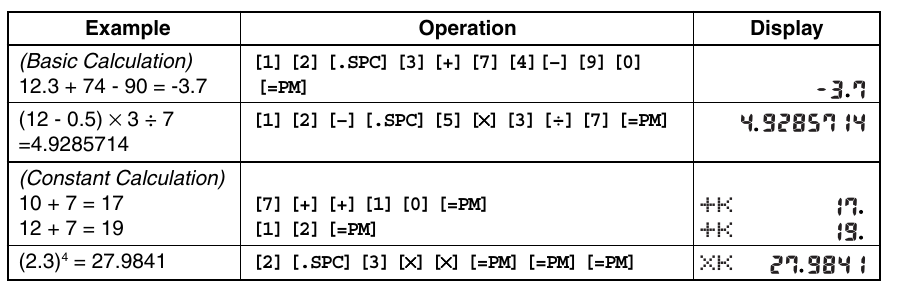
The keypad has no memory or bracket keys. The second example shows the calculator working each operation as the next operator is pressed, from left to right, so (12 − 0.5) × 3 ÷ 7 is typed in order with the brackets left out. The third and fourth examples use the constant: an operator key pressed twice makes the number before it a constant, marked K beside the operator. After [7] [+] [+], every number entered and followed by [=PM] has 7 added to it. After [2] [.SPC] [3] [×] [×], each [=PM] multiplies by 2.3 again, so three presses give the fourth power.
To correct a mistake, C clears the number being typed and leaves the rest of the calculation; a second C clears the whole calculation. A wrong operator is corrected simply by pressing the right one.
6.6.1 Currency conversion
The second Calculator screen is a currency converter holding one exchange rate and one operator, multiply or divide. Its starting rate is × 0. To set it, display the converter (press C on a cleared calculator screen), hold A until the rate flashes, type the rate and the operator, and press A (p. 2). To convert, type the amount and press [=PM]; pressing [=PM] again applies the rate a second time.
6.6.2 The key tone
Holding C for about two seconds on either Calculator screen turns the key beep off, shown by MUTE in every mode, and on again. The alarms sound regardless (p. 3).
6.7 Alarms and the hourly signal
There are five alarms and an Hourly Time Signal, which beeps twice on the hour (p. 3). Each alarm has an hour and minutes and, optionally, a month and a day. What is set decides the kind of alarm:
Table 3 — There are five alarms and an Hourly Time Signal, which beeps twice on the hour (p. 3). Each alarm has an hour and minutes and, optionally, a month and a day. What is set decides the kind of alarm
| Set | Kind | Sounds |
|---|---|---|
| hour and minutes | daily | every day at that time |
| month, day, hour, minutes | date | once, on that date |
| month, hour, minutes | 1-month | every day of that month |
| day, hour, minutes | monthly | on that day of every month |
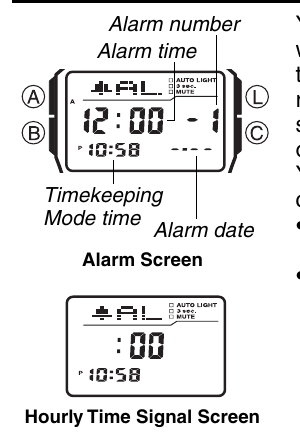
To set an alarm, step to it in the Alarm Mode with [+] and [÷], hold A until the hour flashes, type the time and date (00 for a month or day not wanted), and press A. Setting an alarm turns it on. C turns the alarm on screen, or the hourly signal, on and off; holding C sounds the alarm as a test.
An alarm sounds for 10 seconds in any mode, and any button stops it. Alarm 1 can be a snooze alarm, chosen with C (SNZ al-1): it then sounds seven times, every five minutes, until it is turned off. Alarms 2 to 5 are one-time only, and their indicators, al-2 to al-5, stay on the display in every mode.
6.8 Stopwatch
The stopwatch counts to 23 hours, 59 minutes and 59.99 seconds in hundredths of a second, then starts again from zero; it keeps running when the watch is in another mode (p. 3). C starts and stops it and A takes splits and clears it:
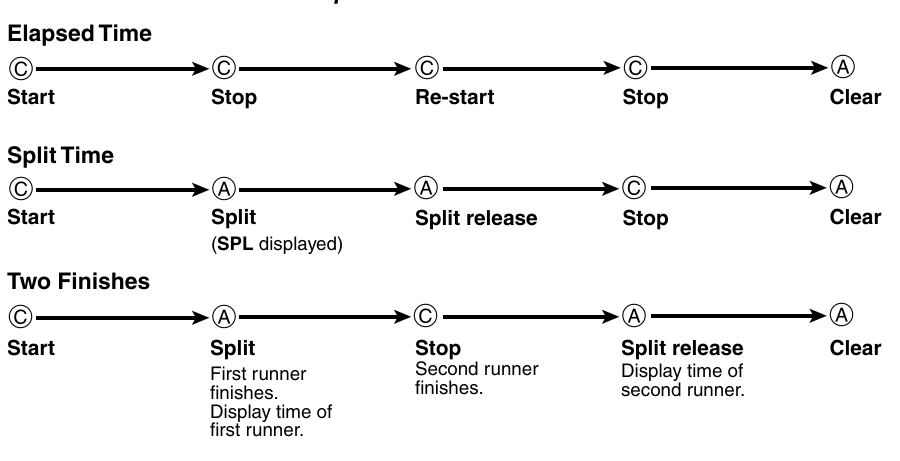
- Elapsed time: C start, C stop, C restart, C stop, A clear.
- Split time: C start, A split (SPL shown, the clock running on behind it), A release, C stop, A clear.
- Two finishes: C start; A when the first runner finishes, freezing that time; C when the second finishes; A to see the second time; A to clear.
6.9 Dual Time
The Dual Time Mode keeps a second time, for another time zone, with its own daylight saving setting; its seconds run in step with the main time (p. 4). To set it, hold A until the hour flashes, type the time, and press A. Holding C for two seconds toggles its DST.
6.10 The light
Module 2888 lights its display with an LED and a light-guide panel. L lights it in any mode, for 1.5 or 3 seconds: in the time-setting screen, L toggles between the two, shown by 3 sec. (p. 4).
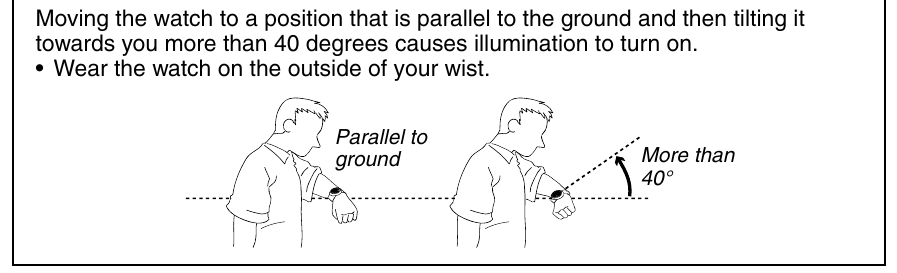
It also has an auto light switch, a tilt switch that lights the display when the wrist is held level and then turned towards the face by more than 40°. Holding L for about two seconds in Timekeeping turns it on and off, shown by AUTO LIGHT; to save the battery it turns itself off after about six hours. Casio adds a warning to turn it off before riding a bicycle or driving, and a note that “a very faint clicking sound” when the watch is shaken is the switch moving, not a fault (p. 4). While the light is on, the keypad does nothing.
The three indicators at the top right of my watch’s display, AUTO LIGHT, 3 SEC and MUTE, are the on-off states of these settings.
6.11 Auto Display
Holding B for about two seconds, until the watch beeps, starts Auto Display, a demonstration that runs through the screens continuously; A, B or C stops it (p. 4).
Sources
- Casio, Operation Guide 2888 (MO0407-EA, July 2004), pp. 1–5.
- The labels on the buttons and keys are read from my own watch.
Comments (0)