VFD Calculators · Volume 4
Driving the Display
A vacuum-fluorescent tube needs three things: a little power to keep its filament warm, a few tens of volts to pull electrons onto the lit segments, and a way to choose which segments of which digit are lit at any moment. This volume takes them in turn, using the voltages and timings that Brent Hilpert measured on working machines and drew into his schematics. The circuits are simple, and they are simple for a reason: the tube was designed so that the calculator’s own chips could drive it.
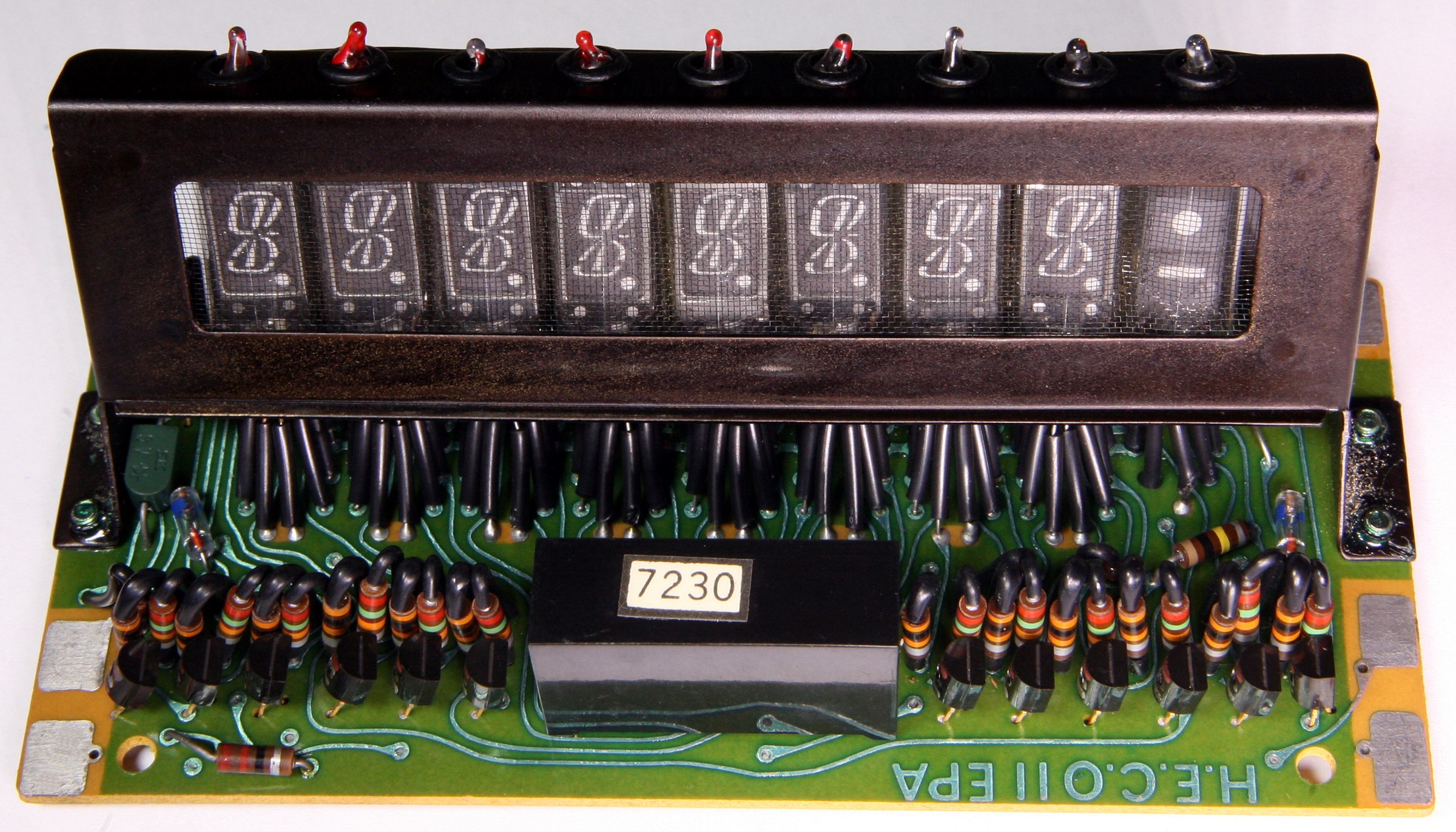
4.1 The filament supply
The filament is the cathode. It is a few centimetres of very thin oxide-coated tungsten that must be kept at 600 to 650 °C, which takes about 0.85 volt at 95 mA for one of Ise’s single-digit tubes of 1968, or a volt or two for a pocket multi-digit tube.
Why AC. If the filament is fed with direct current, one end is a volt or two more negative than the other. Since the electrons are accelerated by the voltage between the filament and the grid and anode, the digits at the negative end get a little more voltage and glow a little brighter. Allegro’s application notes call the result “non-uniform luminance”; Noritake calls it luminance slant. Feeding the filament with alternating current averages the difference away, and taking the reference from a centre tap on the filament winding puts the middle of the filament at the bias voltage, with each end swinging equally above and below it.
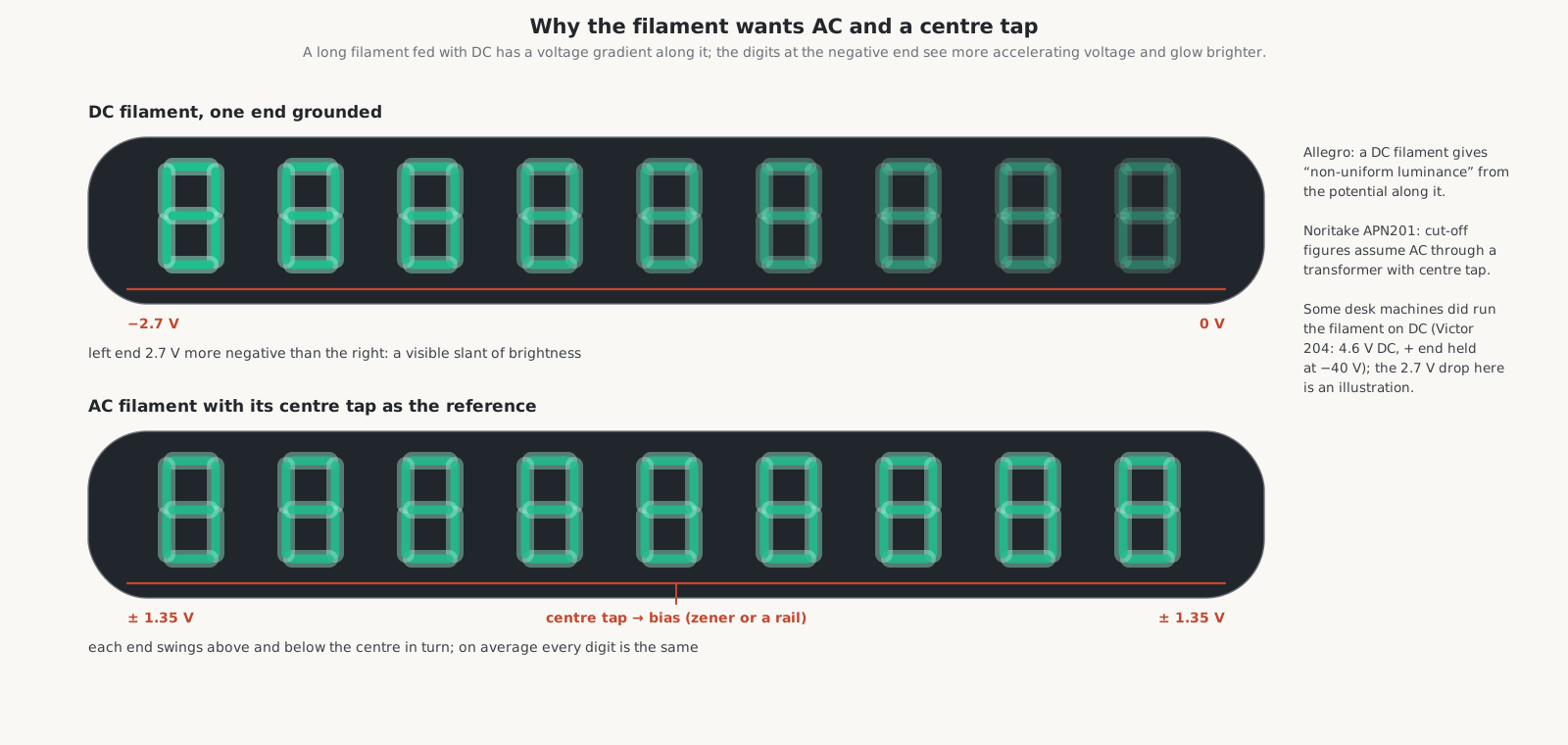
Not every machine bothered. The Victor Medalist 204 desk calculator of 1976 rectifies its filament winding to 4.6 V DC, with the positive end held at −40 V; the Olympia CD401A runs its filament on 1.6 V DC. With a short tube, or one where the filament is hung at slightly different heights along its length to compensate, the slant is small enough to live with.
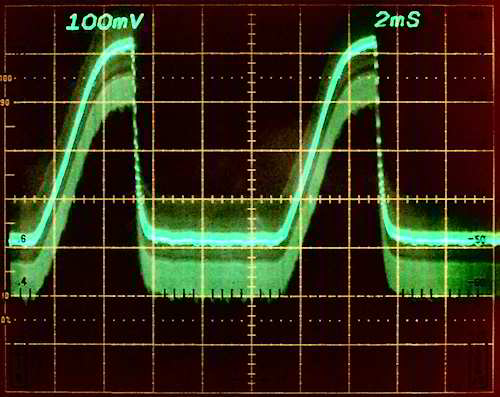
Frequency. A filament fed from a 50 or 60 Hz mains winding can beat against the display refresh if the two are close: National Semiconductor’s application note AN-440 describes a display that “appears to be rolling” when it is refreshed at 40 to 90 times a second. Calculators refreshed their displays hundreds or thousands of times a second, well clear of the mains. Battery machines took their filament AC from the converter at kilohertz frequencies, and modern VFD modules specify 10 to 200 kHz.
4.2 Bias: how “off” is made off
A segment lights when its grid and its anode are both positive with respect to the filament, and stays dark when either is at or below it. To be sure that unselected grids and segments stay dark, the circuit holds them a few volts below the filament. The Ise DG12C datasheet gives the pattern: segment cut-off 0 V and grid cut-off −4 V, both relative to the filament. Noritake’s application note APN201 says the bias “is applied to the filament center-tap”, usually by a Zener diode, so that the total supply is the lit voltage plus the bias.
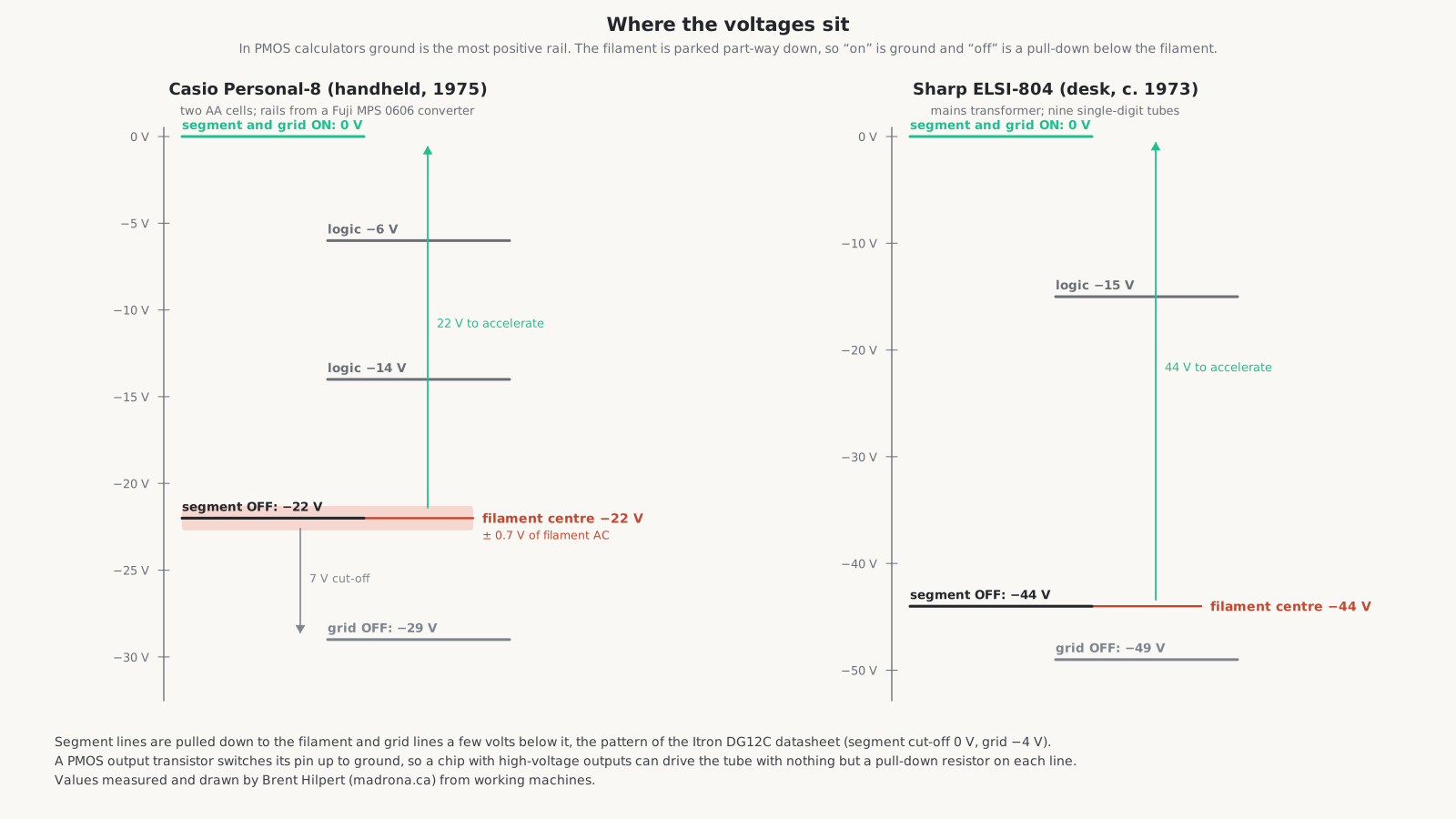
In a calculator the bias is set the other way round. Ground is the most positive rail, the lit level is ground, and the filament is parked part-way down the negative supply. Hilpert’s measurements:
Table 1 — In a calculator the bias is set the other way round. Ground is the most positive rail, the lit level is ground, and the filament is parked part-way down the negative supply. Hilpert's measurements
| Machine | Lit level | Filament centre | Segment off | Grid off |
|---|---|---|---|---|
| Sharp ELSI-804 (desk, c. 1973) | 0 V | −44 V | −44 V | −49 V |
| Olympia CD401A (desk, 1974) | 0 V | −47 V | −55 V | −55 V |
| Victor Medalist 204 (desk, 1976) | 0 V | −40 V (positive end) | −55 V | −55 V |
| Casio Personal-8 (handheld, 1975) | 0 V | −22 V | −22 V | −29 V |
| Royal Digital I (desk, 1971) | — | −77 V (centre of the filament string) | — | — |
The ELSI-804 and the Personal-8 follow the datasheet exactly: segment lines are pulled down to the filament potential, and grid lines 5 to 7 volts below it.
4.3 Why a PMOS chip can drive the tube directly
The calculator chips of 1970–77 were made in p-channel MOS (PMOS). Their most positive supply, VSS, was ground, and their other supplies were negative: −15 V for a TMS1000, −25 V for the Rockwell chips of the Sharp EL-8, a 25 V process for Mostek’s MK6010. A PMOS output transistor is a switch to ground. Turned on, it pulls its pin up to about 0 V; turned off, it lets go, and an external resistor pulls the pin down to a negative rail.
That is exactly what a VFD wants. “On” is ground, 20 to 47 volts above the parked filament; “off” is the pull-down rail, at or below the filament. If the chip’s output transistors can stand the voltage, nothing is needed between chip and tube but one resistor per line. Texas Instruments built chips for the purpose: its 1976 data manual introduces “two versions of high-voltage (35-volt) microcomputers, the TMS 1070 and the TMS 1270”, which provide “direct interface to low-voltage fluorescent displays”, and draws them with a 50 kΩ pull-down to −30 V on every segment and digit line. The CDK C1HB desk calculator of 1977 uses a TMS1273 in just that way: nine segment lines and thirteen digit lines run straight from the chip pins to the tube, each with a 100 kΩ resistor to −35 V. Hitachi’s HD3679 in the Casio Personal-8 does the same on a pocket scale.
4.4 When the chip cannot
Earlier chips, and many desk machines, could not swing the full display voltage, so a transistor stage did the last step. Hilpert’s notes describe the parts: the Hitachi HD3233 and the Toshiba TM4312, TM4352 and TM4356 are 16-pin arrays of single PNP transistors with their emitters joined to ground and open collectors. The logic swings between ground and −15 V; the display supply is about −50 V. The TM4352 has the higher breakdown voltage and is “used mainly as a driver for VF displays”; the HD3233 and TM4312 are logic inverters and “should not replace the TM4352”. They appear in the Ricomac 1216, Miida MC840, Olympia CD401A and Sharp ELSI-804. Other machines did the same job with discrete PNP transistors: the Miida MC800 of 1971 and the Victor 204 use type A628A, with 47 to 100 kΩ collector loads to −55 or −58 V. Sharp’s first machines used hybrid driver packages, and the Crown CL-80K individual 2SA675 transistors.
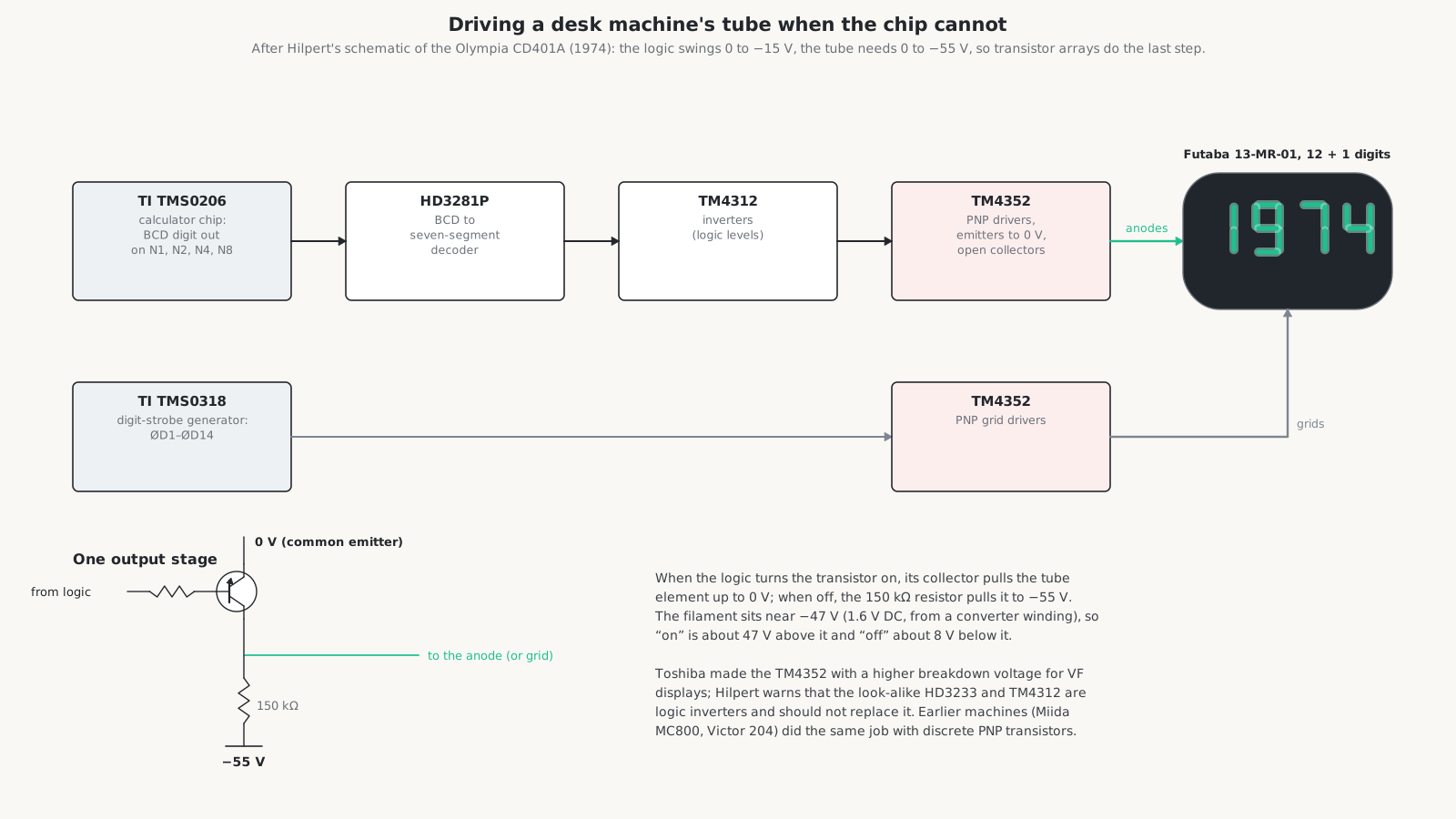
The pull-down resistors are large, 30 to 150 kΩ, to save power, and that has a consequence. Allegro’s notes point out that “the anode and grid essentially represent high impedance capacitive loads”, so a line released by its driver falls back slowly through its resistor. The next section shows why that matters.
4.5 Multiplexing
In a multi-digit tube every digit has its own grid, and the same segment of every digit is joined to one line inside the glass. A twelve-digit module therefore needs only eight to ten segment pins, one pin per grid and two for the filament: the Futaba 13-MT-26 in the Victor 204 has 27 pins for twelve digits and a symbol position. With single-digit tubes the joining is done on the circuit board instead.
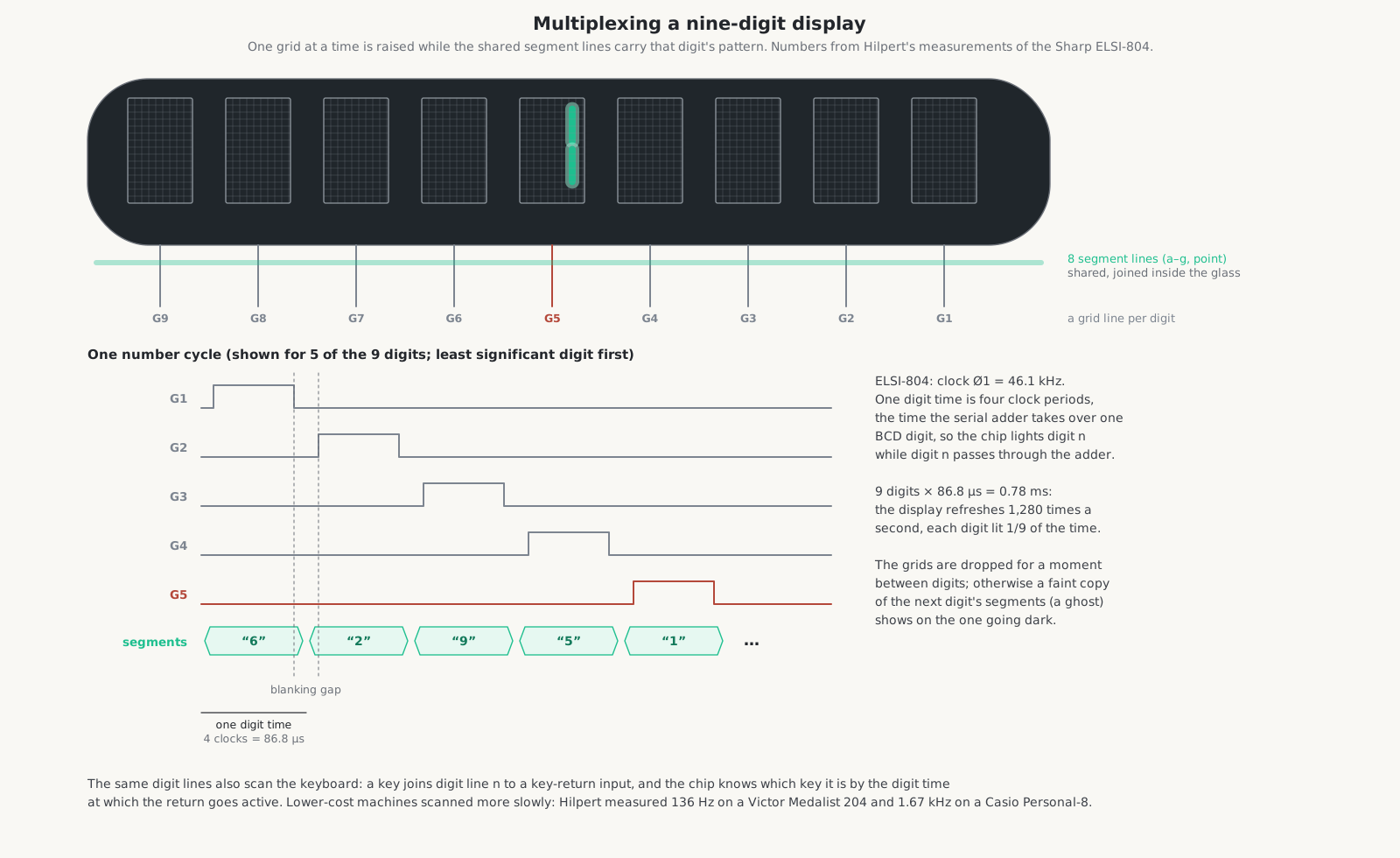
The chip raises one grid at a time and puts that digit’s pattern on the segment lines while the grid is up. Each digit is lit only a fraction of the time, 1/9 for nine digits, but if the whole row is refreshed more than about forty times a second the eye sees all the digits steadily. Calculators did far better than that:
Table 2 — The chip raises one grid at a time and puts that digit's pattern on the segment lines while the grid is up. Each digit is lit only a fraction of the time, 1/9 for nine digits, but if the whole row is refreshed more than about forty times a second the eye sees all the digits steadily. Calculators did far better than that
| Machine | Clock | Digit time | Refresh | Digits | Order |
|---|---|---|---|---|---|
| Sharp ELSI-804 | 46.1 kHz | 4 clocks, 86.8 µs | 1,280 Hz | 9 | least significant first |
| Miida MC800 | 35.9 kHz | 3 clocks lit, 1 blank | about 900 Hz | 8 | — |
| Olympia CD401A | 136 kHz | — | 566 Hz | 12 + 2 flag states | most significant first |
| Victor Medalist 204 | — | — | 136 Hz | 12 + 1 | most significant first |
| Casio Personal-8 | — | — | 1,670 Hz | 8 + 1 | least significant first |
| TI-1025 | — | — | about 190 Hz | 8 | — |
The striking thing about the ELSI-804 is that one digit time on the display is exactly one digit time of the arithmetic: four clock periods, the time the chip’s serial adder takes to handle one decimal digit. The display is lit by the arithmetic clock itself. The chip lights digit n while digit n of the number is passing through its adder, and the whole row is refreshed once each time the number goes round its shift register.
4.6 Blanking and ghosts
If the segment pattern for the next digit arrives while the previous digit’s grid is still up, or still falling slowly through its pull-down resistor, a faint copy of the next digit’s segments appears on the previous one: a ghost. The cure is a short gap between digits, the blanking time, in which every grid is down. Allegro: “the blanking time (tb) is required to allow for the fall time of the pulsed waveforms. This number is dependent on phosphor material and the pull-down resistors.” Noritake suggests 10 to 50 µs.
The Miida MC800 lights each digit for three clock periods and blanks for the fourth. Texas Instruments’ TMS0109 provides “one-state-time leading and trailing blanking on all segments and digits”. The Royal Digital I of 1971 does it with one transistor: a common transistor on the grid-driver bus, kicked by a short pulse through a 10 nF capacitor at the start of each digit time, turns every grid off for a moment at each digit boundary. The phosphor helps: ZnO:Zn lights and goes dark in about 10 µs, so a few microseconds of blanking are enough to remove the ghost without dimming the display.
4.7 The keyboard rides on the same lines
In every calculator schematic in this series the digit strobes do a second job: they are the columns of the keyboard. Each key joins one digit line to one of two to four key-return inputs on the chip. The chip knows which key is pressed by which digit time the return goes active. Slide switches for the decimal setting, rounding or constant are read the same way. Texas Instruments’ TMS0100 describes it in a sentence: the “matrix lines are KN, KO, KP, KQ with digit lines D1–D10 as the other axis.” So a calculator chip of the VFD era needs very few pins: a clock, the supplies, eight segment lines, a digit line for each digit, and three or four key returns.
4.8 Points, signs and zeros
- Decimal point. Either a separate output (pin 24 on the TMS0100) or simply another segment line, asserted during the digit time where the point falls.
- Minus sign, error and memory. Often a whole extra digit position: TI’s TMS0100 uses digit D11 for “negative sign, overflow, and error indication”, and the thirteenth position of the Victor 204’s tube carries M and E symbols. The Sharp EL-8 has a separate two-element Itron SP8A tube for minus and error. The Miida MC800 uses two tiny incandescent lamps beside its fluorescent digits.
- Extra segments. Some tubes had an eighth “h” segment: TI’s TMS0105 was programmed to use it to put a tail on the 4 for the Ise DP102F tube.
- Zero suppression. Leading zeros are blanked by withholding the grid pulse for those digits, not by blanking the segments: Hilpert’s note on the MC800 says “digit pulses are only present for non-blank digits.” Machines without suppression, such as the QT-8D, show their leading zeros as small half-height zeros instead.
4.9 Where the voltages come from
Desk machines use a mains transformer with several windings. In the Sharp ELSI-804 a 4 W transformer gives a regulated −15 V for the logic, separate half-wave windings for −44 V and −49 V, and a filament winding that feeds the nine tubes’ filaments in series through 130 Ω, returned to −44 V. The Victor 204 regulates −15 V for its single Rockwell chip, makes −55 V for the display, and rectifies its filament winding to DC. Some later desk machines rectify a low mains winding and run a DC-DC converter from it: the Olympia CD401A has a single-transistor converter on a TDK transformer, regulated, with secondaries for −10, −16, −47 and −55 V and a filament winding rectified to 1.6 V DC; the CDK C1HB of 1977 a two-transistor blocking oscillator giving −15 and −35 V and the filament supply.
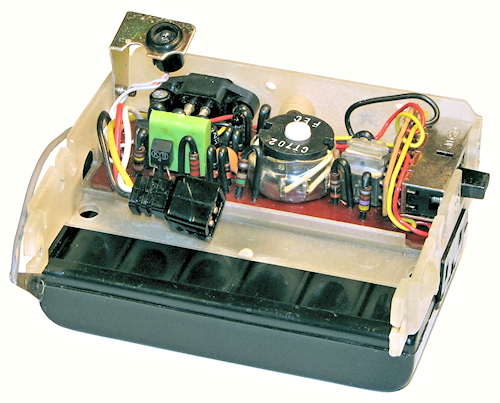
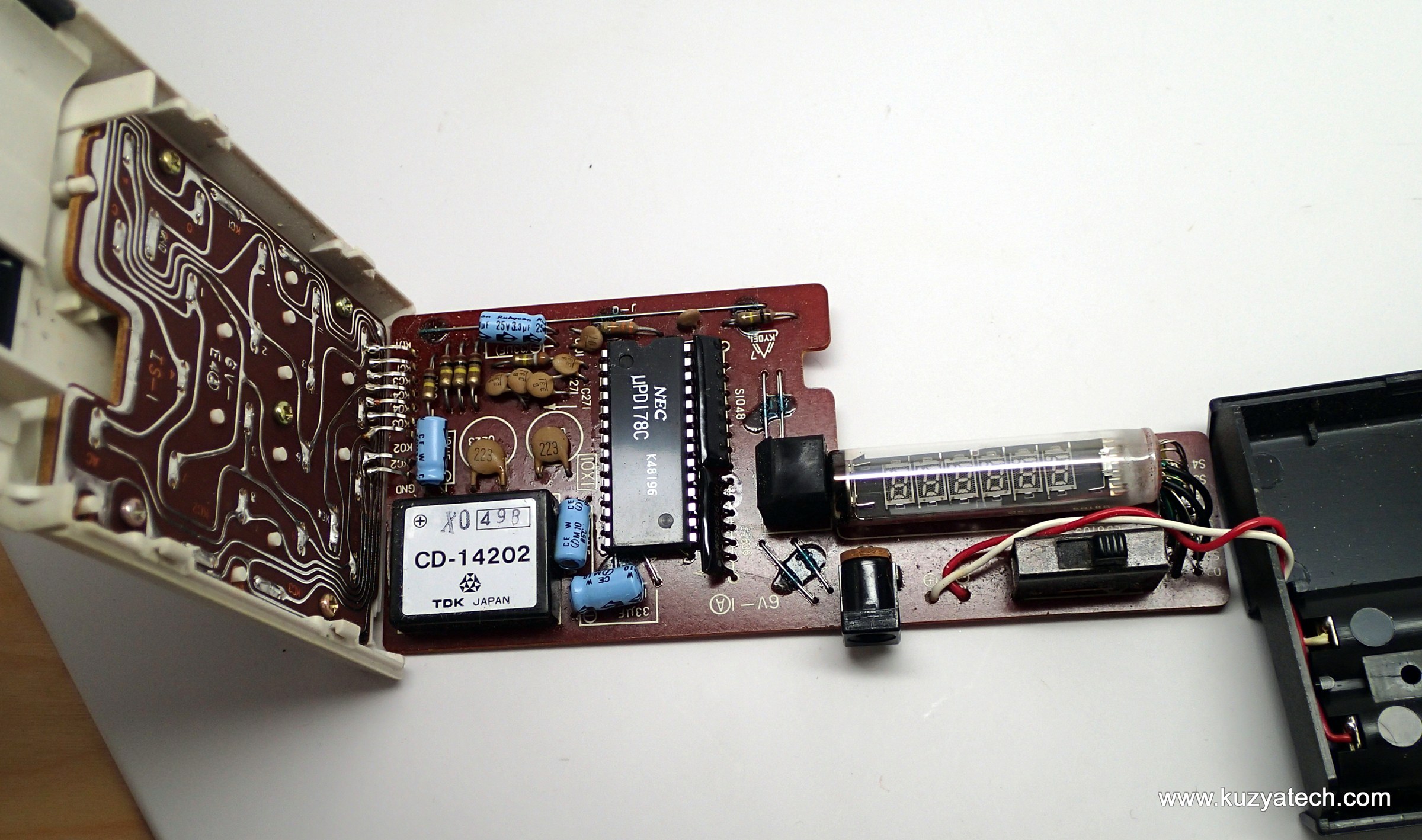
Battery machines make everything from the cells with a converter, usually a small oscillator on a multi-tap transformer. The Casio Personal-8 of 1975 runs on two AA cells, 3 V. Its Fuji MPS 0606 potted module gives −6 V and −14 V for the chip, −22 V for the segment-off rail and filament centre, −29 V for the grid-off rail, and a 1.4 V AC winding for the filament, its centre tap tied to −22 V. The Sharp EL-8’s SanKen inverter runs at about 12.5 kHz from the 7.2 V NiCd pack and makes −25 V for logic and display; the machine draws 60 mA at 5 V and 120 mA at 7.5 V, and keeps working down to about 5 V with a dimming display. Texas Instruments’ TI-1025 of 1979, running from a 9 V battery, uses a charge pump at 61.4 kHz instead of a transformer, and feeds its filament with a 7 V square wave at 30 per cent duty and 1.5 kHz.
4.10 Why VFD calculators eat batteries
The filament is the problem. It turns power into heat whether or not anything is lit, simply to keep the oxide hot enough to emit. Much of the electron current also lands on the grid rather than the segments: the DG12C draws 10 mA of cathode current, but its datasheet gives a segment current of a milliamp or less. Then the converter has its own losses. Whole machines show the result: the Casio Personal-mini used 0.18 W, the Casio Mini about 0.85 W, the Sharp EL-8 0.3 to 0.9 W. Ise’s 1976 paper on a flat nine-digit tube for handhelds shows the engineers attacking it, cutting a filament wire, keeping the filament length, shrinking the anodes, until the whole tube ran on 39.6 mW. A pocket VFD machine ran for about ten hours on its cells. Casio’s early LCD machines advertised 250.
The application notes behind this volume are in the Library: Noritake’s APN201, Allegro’s VF Display Fundamentals, National Semiconductor’s AN-440 and the TI TMS 1000 Series Data Manual of 1976.
Comments (0)