Flight Computers · Volume 6
Operating My E6B
This volume works through Sporty’s electronic E6B function by function. It follows Sporty’s manual of 2005, Version 05A, the closest edition found to my computer, which is the same machine with one menu cell different: where the 2005 version has REQCLIMB, mine has TIMER. Page numbers are that manual’s. My own manual is an earlier edition, so its pages and examples may differ. Keys are shown in bold.
6.1 Power and the display
The E6B runs on three AAA cells in a compartment at the top of the back, which Sporty’s says “should last from six to nine months depending on use” (pp. 3, 45). ON turns it on and returns to the main menu; OFF only blanks the display. The display switches itself off about four minutes after the last key, while the clocks and the timer keep running (p. 3). Memory is cleared only by taking the batteries out, which also clears the clocks.
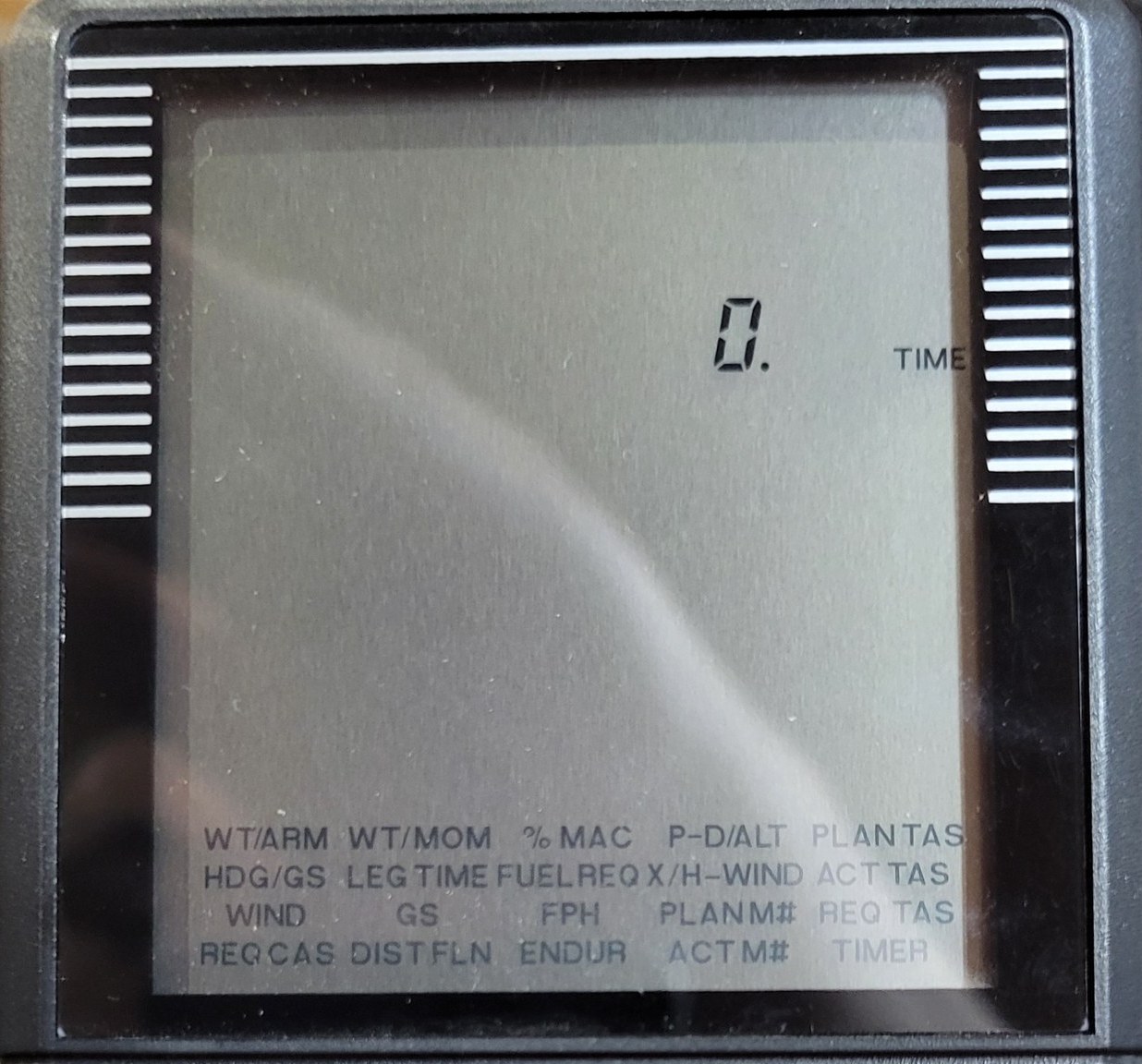
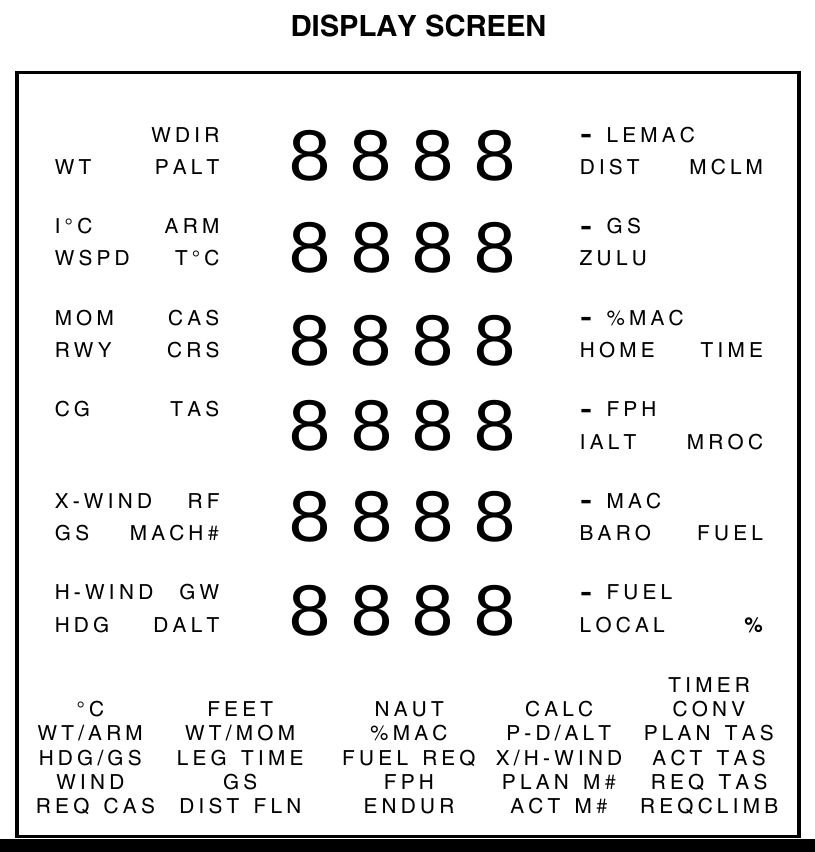
The display has six lines of digits, each with labels beside it that light to show what the number is, and the menu of functions printed across the bottom. Sporty’s notes that the menu “will remain visible whenever the power is on”, while “the display prompts and labels are only visible when in use” (p. 4). At switch-on the cursor rests on FUEL REQ, which “flashes on the main menu when the computer is turned on” (p. 18), so my display shows its first prompt, TIME.
6.2 The keys
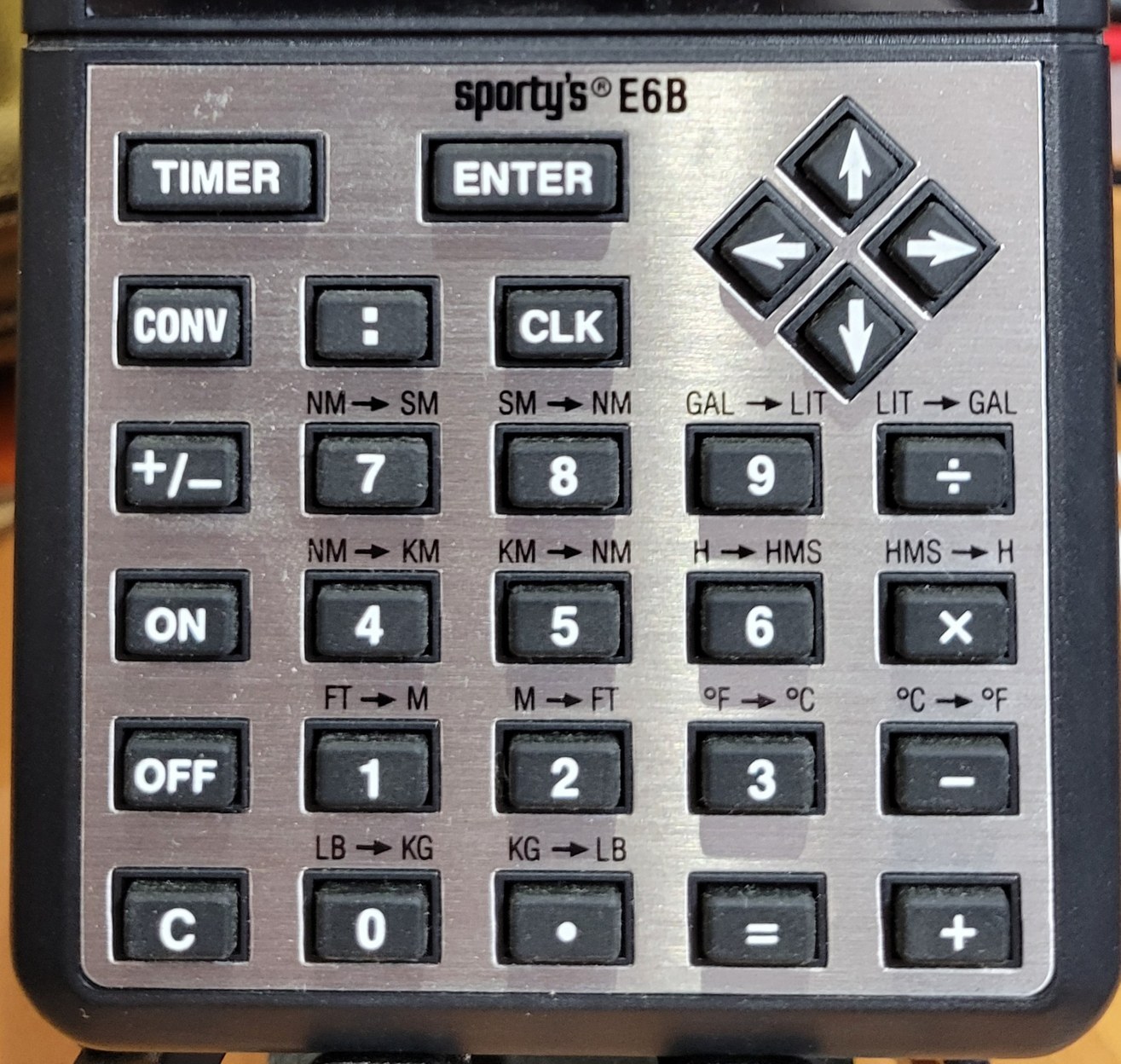
Table 1 — The keys
| Key | Does (Sporty’s manual, p. 7) |
|---|---|
| ON / OFF | power on and back to the menu / display off |
| arrow pad | moves the menu cursor; the chosen function blinks |
| ENTER | selects a function, and enters each value |
| C | clears the current input line |
| CONV | gives the next key its conversion |
| : | separates hours, minutes and seconds |
| CLK | shows and sets the three clocks |
| TIMER | starts and stops the timer |
| +/− | changes sign; a negative number shows a minus at the right |
| + − × ÷ = | arithmetic, at any time, even in the middle of a function |
To work a problem: move the cursor to the function with the arrows, press ENTER, then answer each prompt in turn with a number and ENTER. The answers appear with their labels flashing. The E6B carries values from one function to the next, true airspeed, ground speed, time and fuel flow, so they need not be keyed twice (pp. 8–9). Answers show up to six digits.
Conversions work at any moment, even in the middle of a prompt: type a value, press CONV and the key under the conversion wanted. Converting 4.2625 hours to hours, minutes and seconds is 4.2625 CONV 6 → 04:15:45 (p. 9). Sporty’s other examples (pp. 38–39): 100 nautical miles → 185.2 km; 87 nautical miles → 100.117 statute miles; 25 pounds → 11.3398 kg; 1 US gallon → 3.78541 litres; 100 °C → 212 °F.
Time arithmetic uses the : key: 3 : 14 : 25 is 03:14:25; times and decimal hours can be mixed, and 3.45 + 2:45 = gives 06:12:00 (pp. 12–13).
6.3 Clocks and timer
The E6B keeps three clocks, ZULU, HOME and LOCAL, running at once (p. 11). CLK 0 shows them. To set ZULU to 11:25: CLK 1, 11 :, 25, CLK. HOME and LOCAL set their hours the same way with CLK 2 and CLK 3, and share ZULU’s minutes and seconds.
The timer counts up or down (pp. 13–14). TIMER starts and stops it; CONV TIMER changes its direction; C CLK TIMER clears it. A countdown that reaches zero carries on counting up, with a minus sign, to show the time since zero. Sporty’s suggests it for switching fuel tanks, timing an approach, and timing the leg between two checkpoints for the GS function; after a LEG TIME problem, CONV TIMER starts a countdown from the computed time. While a countdown runs, the display stays on for about thirty minutes.
6.4 The functions, with Sporty’s examples
The table lists each function’s prompts in the order the E6B asks for them, and its answers (pp. 14–37):
Table 2 — The table lists each function's prompts in the order the E6B asks for them, and its answers (pp. 14–37)
| Menu | Asks for | Gives |
|---|---|---|
| P-D/ALT | indicated altitude, altimeter setting, temperature | pressure and density altitude |
| PLAN TAS | pressure altitude, true temperature, CAS | TAS, Mach, density altitude |
| ACT TAS | pressure altitude, indicated temperature, CAS | TAS, Mach, density altitude |
| HDG/GS | wind direction and speed, course, TAS | ground speed, heading |
| WIND | course, TAS, ground speed, heading | wind direction and speed |
| X/H-WIND | wind direction and speed, runway number | crosswind, headwind |
| REQ TAS | wind, course, ground speed wanted | TAS needed, heading |
| REQ CAS | pressure altitude, true temperature, TAS | CAS, Mach, density altitude |
| LEG TIME | distance, ground speed | time |
| GS | distance, time | ground speed |
| DIST FLN | ground speed, time | distance |
| FUEL REQ | time, fuel per hour | fuel |
| FPH | fuel, time | fuel per hour |
| ENDUR | fuel, fuel per hour | time |
| PLAN M# / ACT M# | true / indicated temperature, Mach | TAS |
| WT/ARM, WT/MOM | weight with arm or moment, reduction factor | moment, centre of gravity, gross weight |
| %MAC | LEMAC, centre of gravity, MAC | % of MAC |
Heading and ground speed (p. 16). Wind 270° at 20, course 180°, TAS 185: arrow to HDG/GS, ENTER, then 270 ENTER 20 ENTER 180 ENTER 185 ENTER. The display shows GS 183.9 and HDG 186.2.
Finding the wind (pp. 21–22). Course 355°, TAS 200, ground speed 170, heading 350°: WIND, then 355 200 170 350, each with ENTER: W DIR 324.2, W SPD 34.
Crosswind (pp. 19–20). Wind 270° at 20 on runway 30: X/H-WIND, 270 20 30. “Note that the runway number, not heading, is asked for, and therefore 30 should be entered, not 300.” The display shows X-WIND 10.− and H-WIND 17.3−: by Sporty’s convention a crosswind from the right is positive and from the left negative, and a tailwind positive and a headwind negative, so this is a 10-knot crosswind from the left and a 17.3-knot headwind.
True airspeed (pp. 15–16). Pressure altitude 10,000 feet, 2 °C, CAS 200: PLAN TAS → TAS 234.7, MACH# 0.36, D ALT 10775. With the aircraft’s indicated temperature of 3 °C instead, ACT TAS gives TAS 232.
Pressure and density altitude (pp. 14–15). Indicated altitude 10,000, altimeter 29.94, 5 °C: P-D/ALT → P ALT 9980, D ALT 11093.
Leg time, ground speed and fuel (pp. 17–29). 25 miles at 185 knots: LEG TIME → 00:08:06. 18 miles in 7 minutes (time keyed 0 : 7): GS → 154.3. 3 h 15 min at 14 gallons an hour (3 : 15): FUEL REQ → 45.5. 74 gallons at 14 an hour: ENDUR → 05:17:09.
Weight and balance (pp. 30–33). WT/ARM: empty weight 2,467 pounds at 76.7 inches, reduction factor 1 (the default): MOM 189218, CG 76.7. Each further item is entered the same way and added to the running totals; the manual works out the fuel inside the prompt, 72.5 × 6 = giving 435 pounds. With fuel, two front passengers, two rear passengers and 18 pounds of baggage, the total is GW 3600, CG 80.39; a passenger taken out is entered as a negative weight, 170 +/−, giving GW 3430, CG 78.67. WT/MOM does the same with moments, divided by a reduction factor such as 100, and %MAC turns the centre of gravity into a percentage of the wing’s chord: LEMAC 22.29, CG 37.27, MAC 61.4 → 24.4 %.
Mach (pp. 24–30). At −20 °C (keyed 20 +/−) and Mach 0.85: PLAN M# → TAS 527.2.
6.5 When it goes wrong
Sporty’s manual lists no error messages. Its troubleshooting advice (p. 45) is short: a dim display or no response means new batteries; check that the batteries are seated; the display may go blank in heat; and “be sure that units agree, i.e., all units in statute miles, nautical miles, or kilometers”.
Sources
- Sportsman’s Market, Sporty’s E6B Electronic Flight Computer manual, Version 05A (2005), pp. 3–46; for comparison, the 2012 and 2016 manuals for the redesigned model.
- The key legends and the display menu are read from my own E6B.
Comments (0)