Scientific Calculators · Volume 8
Repair, Hacks and Fakes
A modern scientific calculator rarely breaks. Its one chip has no moving parts, its display draws almost nothing, and its battery lasts years. What does go wrong is the battery, a key that stops registering, or a crack in the case or the display. This volume covers those, and two things particular to the Casio ES series: how an fx-82ES can be turned into its bigger sibling, and how to tell a real Casio from a counterfeit.
8.1 Batteries
Casio fx-82ES. One AAA cell (R03), behind a cover held by a single screw. Casio’s procedure (E-49):
- Switch off with SHIFT AC, and slide the hard case onto the front to protect the keys.
- Remove the screw and the battery cover on the back.
- Fit the new cell the right way round.
- Put the cover back, then press ON, SHIFT 9 3 = to reset the calculator. Casio is emphatic: “Make sure you perform the above key operation. Do not skip it.”
Taking the battery out clears the memory M and the variables. Casio advises a new battery every two years even if the old one seems fine; dim figures mean a weak one. The solar fx-85ES and fx-991ES use an LR44 button cell behind a back held by several screws.
TI-36X Pro. One 3-volt CR2032, inside the case. iFixit’s guide, written by Cal Poly students in 2014:
- Remove the six 6 mm screws on the back with a Phillips #1 screwdriver.
- Prise the back off from the notches on its top edge.
- Remove the battery cover, held by two 7.5 mm screws (Phillips #00). A blue wire runs to it: leave both ends connected.
- Lift the cell out with a spudger and fit the new one with its positive side up.
TI’s own guidebook gives a shorter version and warns to fit the cell the right way round. One owner needed the reset button afterwards; another warned that repeated resets left a calculator dead.
8.2 The solar panel
The TI-36X Pro’s solar panel is held by one 4.5 mm screw and taped to its cover. iFixit’s warning: slide a spudger under it rather than prising, and if it has to be replaced, note that its red (+) and black (−) wires are soldered; reversing them “can irreparably damage the calculator”. My fx-82ES has no solar panel to fail.
8.3 Keys that stop working
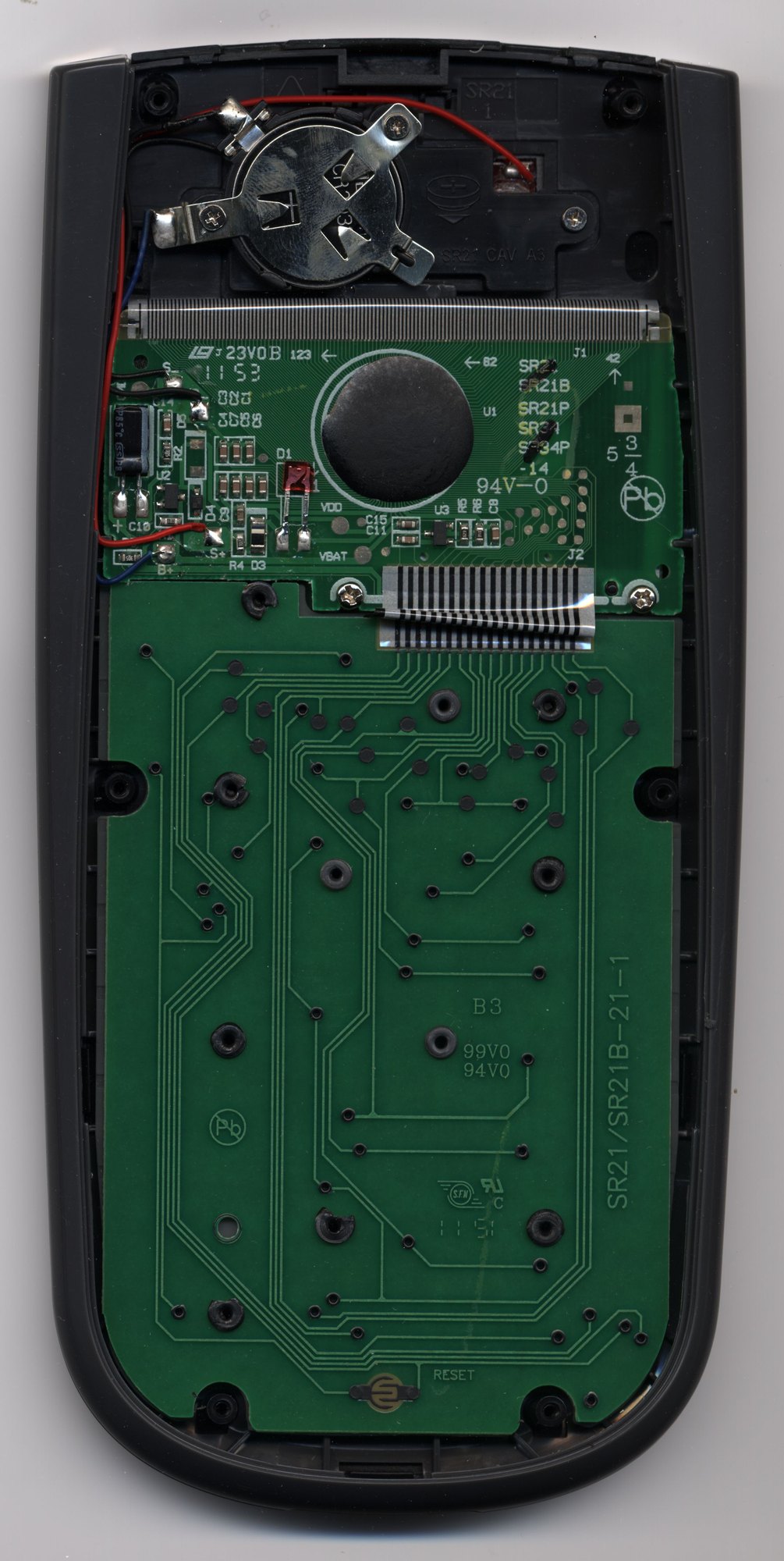
Every key on a modern scientific is a rubber dome with a pill of conductive carbon on its underside, pressing on two contact tracks. Over years the carbon and the tracks build up a film, and keys need pressing harder or stop working. Repairers report:
- Cleaning the board’s contacts and the carbon pills with isopropyl alcohol, which is generally safe on carbon; solvents and contact cleaners can damage carbon or silver printed on plastic. Cleaning sometimes removes the carbon and makes things worse.
- Testing the contacts with a multimeter before deciding what is wrong.
- Restoring dead pills with graphite powder, which is temporary, or with small pads of aluminium foil glued on.
Getting at the keys of a TI-36X Pro is a bigger job (iFixit): after the back and the screw by the solar panel, two screws either side of the striped flexible connector that joins the two boards, then the lower board, which is held by eleven plastic posts melted over at the factory. They have to be cut off, and the board glued back afterwards. Take care not to scratch the gold contact lines. The grey rubber key mat peels off from a top corner, and the key tops are loose and fall out if the calculator is turned over.
No teardown guide for the fx-82ES has been published.
8.4 The display
Liquid-crystal displays are damaged by cold, heat and pressure. Casio’s guide warns that cold makes the display slow or fail and that heat and direct sun can deform the case and damage the circuit. A display that shows nothing may only need a new battery or a contrast adjustment; on the TI-36X Pro, 2nd and + or − change the contrast. No repair guide for the display connection of either calculator has been found.
8.5 Turning an fx-82ES into an fx-991ES
Because the fx-82ES and the fx-991ES share one chip and one program, the fx-82ES contains functions it is not supposed to show: complex numbers, matrices, vectors, equation solving and calculus. Two ways of reaching them have been published.
- By keystrokes. In 2017 Hackaday reported a long sequence of key presses that turns an fx-82ES into something like an fx-991ES, “apparently a buffer overflow exploit”, lost every time the calculator is switched off. Aguilera Dario automated it with a small Arduino board wired to the calculator’s keyboard lines through four analogue switches, which presses the keys electronically and draws about 2 µA when idle.
- By a pencil. On early fx-82ES boards, marked with a circled A above “Made in China” on the back, owners reported that shading over a small pad marked P4 with a soft pencil made the change permanent. Casio changed the board for later “B” units. Reports differ on whether it works; one owner said it did not.
On the ES PLUS, the boards of the fx-82ES PLUS and fx-991ES PLUS are reported to differ only in the solar circuit and a pad called P101, though that is a hobbyist’s suggestion, not a confirmed fact. My fx-82ES is a plain ES; whether its board is an A or a B is on its back.
8.6 Diagnostic mode
The larger ES calculators, the fx-115ES, fx-300ES and fx-991ES, have a hidden self-test: hold SHIFT and 7 and press ON. SHIFT then steps through test patterns on the display, shows the ROM version and a model code, tests the contrast and then each key in a fixed order, and ends with “TEST OK”. It may clear the memory. Whether the fx-82ES has the same mode is not recorded, though it shares the program.
8.7 Spotting a counterfeit Casio
Casio’s calculators are counterfeited, and Casio publishes warnings. Its newer models, the ClassWiz EX and CW series, can show a QR code that a phone checks against Casio’s records, though Casio says the check “estimates the authenticity” and “does not necessarily guarantee that the product is genuine”. For older models like the ES series, which predate the check, Casio points to the hologram sticker on the packaging, and lists signs of a fake:
- no panel reinforcing the back of the display;
- batteries that do not match the type printed on the calculator;
- wrong answers.
The last is easy to test against the user’s guide: an fx-82ES set to Fix 3 should give 100 ÷ 7 = 14.286, and the calculator forensics test of the previous volume should give 9.00000000733343.
Sources
- Casio, fx-82ES User’s Guide, pp. E-4, E-48 to E-50; TI, TI-36X Pro Guidebook, pp. 79–80.
- iFixit guides to the TI-36X Pro: battery, solar panel, buttons and back cover (2014).
- EEVblog and cctalk threads on restoring rubber keyboards.
- Hackaday, “Crippled calculator features unlocked with automated help” (13 January 2017) and the hackaday.io “calculator hack” project; TechEnclave forum threads on the P4 and P101 pads; Mike Sebastian’s notes on the Casio self-test (rskey.org).
- Casio’s authenticity-check pages and anti-counterfeit leaflet.
Comments (0)