Scientific Calculators · Volume 6
Operating the Casio fx-82ES
The fx-82ES is meant to be used without a manual: type the expression as it is written and press =. But it has three modes, a setup menu, two input formats and a key, S⇔D, that changes how answers are shown, and knowing them makes it much more useful. Every example here is from Casio’s fx-82ES User’s Guide or its separate appendix of key sequences, and every result has been checked against those documents. Page numbers are the guide’s own, E-1 to E-51.
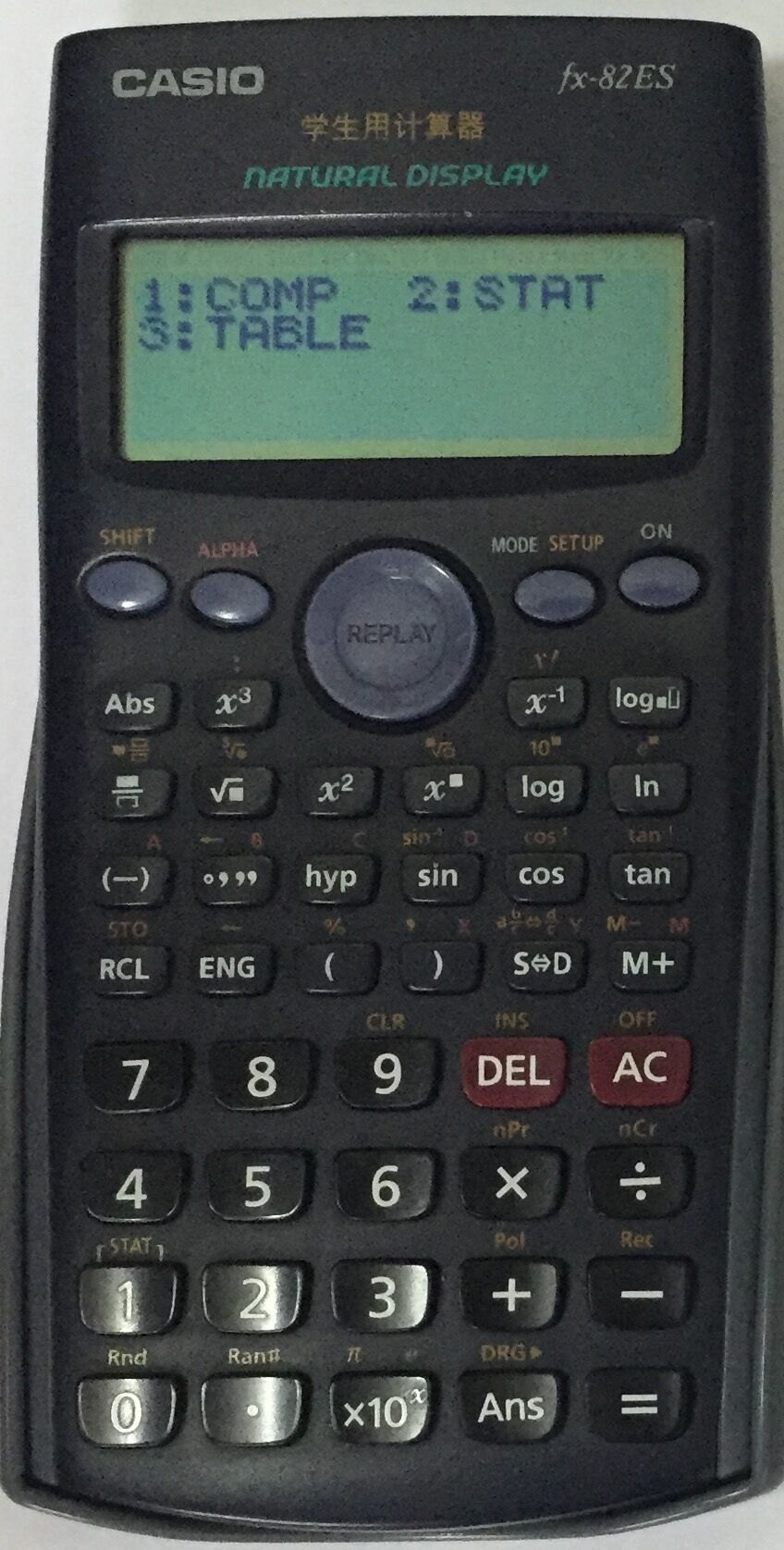
6.1 The keys
The top row holds SHIFT (yellow labels above the keys), ALPHA (red labels: the variables A to D, X, Y and M), the round cursor pad, MODE with SETUP on its shift, and ON. DEL deletes, AC clears (and SHIFT AC switches off). S⇔D switches an answer between its standard form, a fraction or a multiple of π, and a decimal. The fraction key draws a fraction template; SHIFT and the same key draws a mixed number.
6.2 Modes
MODE offers three (E-7):
Table 1 — MODE offers three (E-7)
| Mode | For | |
|---|---|---|
| 1 | COMP | ordinary calculation |
| 2 | STAT | statistics and regression |
| 3 | TABLE | a table of values of a function |
There is no equation solver, complex mode, base-n or matrix mode; those are on the fx-570ES and fx-991ES.
6.3 Setup
SHIFT MODE (SETUP) has two screens (E-7 to E-9):
- 1 MthIO (Math format): fractions, roots and powers typed and shown as on paper. 2 LineIO (Linear): everything on one line, as on older calculators.
- 3 Deg, 4 Rad, 5 Gra: the angle unit.
- 6 Fix (0–9 decimal places), 7 Sci (0–9 significant digits), 8 Norm (1 or 2): how answers are shown.
- On the second screen: fractions as mixed (ab/c) or improper (d/c), a frequency column for statistics, and a dot or comma for the decimal point.
The defaults are COMP, MthIO, Deg, Norm 1 and improper fractions. SHIFT 9 1 = restores them.
The display settings change how answers look, not how they are calculated (E-8 and E-9):
Table 2 — The display settings change how answers look, not how they are calculated (E-8 and E-9)
| Setting | Calculation | Display |
|---|---|---|
| Fix 3 | 100 ÷ 7 = | 14.286 |
| Fix 2 | 100 ÷ 7 = | 14.29 |
| Sci 5 | 1 ÷ 7 = | 1.4286 × 10⁻¹ |
| Sci 4 | 1 ÷ 7 = | 1.429 × 10⁻¹ |
| Norm 1 | 1 ÷ 200 = | 5 × 10⁻³ |
| Norm 2 | 1 ÷ 200 = | 0.005 |
Norm 1 switches to scientific notation below 0.01, Norm 2 only below 10⁻⁹. Both do so from 10¹⁰ up.
6.4 Fractions
In Math format, the fraction key draws a template; type the numerator, press ▼, type the denominator, press ▶ to leave it (E-20, appendix #001–#002):
Table 3 — In Math format, the fraction key draws a template; type the numerator, press ▼, type the denominator, press ▶ to leave it (E-20, appendix #001–#002)
| Calculation | Result |
|---|---|
| 2/3 + 1/2 | 7/6 |
| 3¼ + 1⅔, mixed format | 4 11/12 |
| 4 − 3½, mixed format | ½ |
Results are always reduced, and any calculation that mixes fractions and decimals gives a decimal. S⇔D switches between the fraction and its decimal: 5/6 becomes 0.8333333333 and back again.
6.5 Percentages
The % sign is SHIFT and the ( key (E-21, appendix #004–#010):
Table 4 — The % sign is SHIFT and the ( key (E-21, appendix #004–#010)
| Calculation | Keys | Result |
|---|---|---|
| 20 % of 150 | 150 × 20 SHIFT % = | 30 |
| What percentage of 880 is 660? | 660 ÷ 880 SHIFT % = | 75 |
| Increase 2,500 by 15 % | 2500 + 2500 × 15 SHIFT % = | 2875 |
| Discount 3,500 by 25 % | 3500 − 3500 × 25 SHIFT % = | 2625 |
| Discount the sum of 168, 98 and 734 by 20 % | 168 + 98 + 734 =, then Ans − Ans × 20 SHIFT % = | 800 |
| 800 g as a percentage of 500 g | 800 ÷ 500 SHIFT % = | 160 |
6.6 Degrees, minutes and seconds
The °′″ key enters sexagesimal values (E-22, appendix #012): 2 °′″ 20 °′″ 30 °′″ + 0 °′″ 39 °′″ 30 °′″ = gives 3°0′0″.
6.7 Ans and memories
Every result goes into Ans, which holds up to 15 digits and survives switching off. Starting a new calculation with an operator uses it at once: after 3 × 4 =, typing ÷ 30 = divides the 12 by 30 and gives 0.4 (E-24).
The independent memory M adds and subtracts results (E-26):
Table 5 — The independent memory M adds and subtracts results (E-26)
| Keys | Effect |
|---|---|
| 23 + 9 M+ | M = 32 |
| 53 − 6 M+ | M = 79 |
| 45 × 2 SHIFT M+ (M−) | M = −11 |
| 99 ÷ 3 M+ | M = 22 |
| RCL M+ | shows 22 |
Six more variables, A, B, C, D, X and Y, are stored with SHIFT RCL (STO) and a letter, and recalled with RCL or used inside an expression with ALPHA and the letter. Taking out the battery clears M and the variables.
6.8 Replay
After =, the ◀ key brings the calculation back for editing (appendix #014): 4 × 3 + 2.5 = gives 14.5; ◀, delete the ”+ 2.5” and type ”− 7.1”, =, gives 4.9.
6.9 Statistics
MODE 2 (STAT) offers single-variable statistics and seven regressions: linear (A + BX), quadratic, logarithmic, two exponential forms (e^X and A·B^X), power (A·X^B) and inverse (1/X). Data are typed into a column editor, X alone or X and Y, with an optional frequency column; SHIFT 1 opens the STAT menu for the sums, the mean and standard deviation, the minimum and maximum, and the regression coefficients and estimates (E-33 onward).
6.10 Tables
MODE 3 (TABLE) tabulates a function of X (E-41 to E-43). Type f(X), press =, then give the start, end and step. The guide’s example is f(x) = x² + ½ from 1 to 5 in steps of 1. A table can hold at most 30 values.
6.11 When something goes wrong
Casio’s guide suggests, in order: check the expression, check the mode, press ON (which runs a self-check and, if it finds a fault, resets the modes and clears memory), and finally reset everything with SHIFT 9 3 = (E-48). Low battery shows as dim figures, and Casio advises replacing the battery every two years even if it seems fine.
Sources
- Casio, fx-82ES/83ES/85ES/300ES/350ES User’s Guide (RCA502136-001V01) and its Appendix (RCA502155-001V01).
- For comparison: the fx-82MS guide, the generation before, and the fx-115ES and fx-991ES guide, with the modes the fx-82ES lacks.
Comments (0)