Financial Calculators · Volume 6
Operating the 12C
This volume works through the 12C from switching it on to pricing a bond, using HP’s HP 12c financial calculator user’s guide, Edition 5 (April 2008), the edition for the ARM-based 12C. Keys are shown in brackets, [n]; shifted functions as f AMORT or g END. Results are shown as the calculator displays them with two decimal places, its setting after a reset. Page numbers are the guide’s. The worked examples printed on the back of my calculator come last, with their answers, which the label does not give.
6.1 The keyboard
Most keys have three functions. The white label on the key is its main function; the gold label above the key is reached by pressing the gold f key first, and the blue label on the lower face of the key by pressing the blue g key first (p. 16). So the key marked n also gives AMORT (f) and 12× (g). A wrong prefix is cancelled with f CLEAR PREFIX. The ON key sits lower than the others so that it is not pressed by accident, and the calculator switches itself off “8 to 17 minutes after it was last used” (p. 16).
6.2 RPN: numbers first
The 12C has no equals key. A number is keyed, ended with ENTER, the second number keyed, and then the operation pressed: 13 ÷ 2 is 13 [ENTER] 2 [÷] → 6.50 (p. 19). The calculator holds three numbers besides the one on display, in a stack of four registers, X, Y, Z and T, so longer calculations need no brackets and no memory:
- a running total:
58.33 [ENTER] 22.95 [−] 13.70 [−] 10.14 [−] 1053 [+]→ 1,064.54 (pp. 20–21); - (3 × 4) + (5 × 6):
3 [ENTER] 4 [×] 5 [ENTER] 6 [×] [+]→ 42.00 (p. 22).
x≷y swaps the two lowest numbers; R↓ rolls the stack; g LST x brings back the number used in the last operation, handy for a constant: 15 [ENTER] 4.38 [×] → 65.70, then 75 g [LST x] [×] → 328.50 (pp. 74–75). Twenty storage registers, R0–R9 and R.0–R.9, are reached with STO and RCL, and register arithmetic such as STO + 0 works on R0 to R4.
6.3 Clearing and display
Table 1 — Clearing and display
| Keys | Clears |
|---|---|
| CLx | the display |
| f CLEAR Σ | the statistics registers and the stack |
| f CLEAR PRGM | programs (in program mode) |
| f CLEAR FIN | the five financial registers |
| f CLEAR REG | all registers, financial ones included |
f with a digit sets the number of decimal places shown, from 0 to 9; f . gives scientific notation. The calculator always works with ten digits whatever it shows, except that f RND rounds the stored number to the display, and AMORT and the depreciation keys round their results the same way (pp. 70–72). Mine shows 0.0000, four places.
6.4 Percentages
- %: 14 per cent of 300:
300 [ENTER] 14 [%]→ 42.00 (p. 26). The base stays in place, so + then gives the total. - A car listed at 13,250, discounted 8 per cent, plus 6 per cent tax:
13250 [ENTER] 8 [%] [−]→ 12,190.00;6 [%] [+]→ 12,921.40 (p. 27). - Δ%, percentage change: a share from 58.50 to 53.25:
58.5 [ENTER] 53.25 [Δ%]→ −8.97 (p. 27). - %T, percentage of total: sales of 3.92, 2.36 and 1.67 million:
3.92 [ENTER] 2.36 [+] 1.67 [+] 2.36 [%T]→ 29.69 per cent (p. 28).
6.5 Dates
Dates are keyed as numbers: in the American order, g M.DY, 7 April 2004 is 4.072004; in the European order, g D.MY, it is 7.042004 (pp. 29–30). g DATE adds days to a date and shows the result with a final digit for the day of the week, 1 for Monday to 7 for Sunday: in D.MY, 14.052004 [ENTER] 120 g [DATE] → 11,09,2004 6, Saturday 11 September 2004 (p. 31). g ΔDYS gives the days between two dates, actual days first and then, after x≷y, days on a 360-day year: 3 June 2004 to 14 October 2005 is 498 and 491 (p. 31).
6.6 Simple interest
Days in n, the annual rate in i, the principal in PV with its sign changed, then f INT gives interest on a 360-day year (p. 33): 60 [n] 7 [i] 450 [CHS] [PV] f [INT] → 5.25, and + → 455.25. For a 365-day year, after f INT press R↓ x≷y → 5.18, and + → 455.18 (pp. 33–34).
6.7 Loans, savings and the five keys
Store four of n, i, PV, PMT and FV, press the fifth, and the 12C calculates it (volume 5). Money paid out is entered negative with CHS. g END and g BEG set the payment timing, with BEGIN shown on the display; g 12× multiplies the number of years by 12 and stores it in n, and g 12÷ divides the annual rate by 12 and stores it in i. Start each problem with f CLEAR FIN.
HP’s examples:
Table 2 — HP's examples
| Problem | Keys | Result |
|---|---|---|
| Monthly payment on 43,400 over 29 years at 14¼ % (pp. 46–47) | 29 g [12×] 14.25 g [12÷] 43400 [PV] g [END] [PMT] | −523.99 |
| What is left after 5 years (p. 48) | 5 g [12×] 14.25 g [12÷] 43400 [PV] 523.99 [CHS] [PMT] [FV] | −42,652.37 |
| Half-yearly saving to reach 60,000 in 15 years at 9¾ %, from 3,200 (p. 47) | 30 [n] 4.875 [i] 3200 [CHS] [PV] 60000 [FV] g [END] [PMT] | −717.44 |
| 50 a month at the start of each month for 2 years at 6¼ % (p. 49) | 2 g [12×] 6.25 g [12÷] 50 [CHS] [PMT] g [BEG] [FV] | 1,281.34 |
| Dearest car affordable at 150 a month, 4 years, 15 %, with 1,500 down (p. 45) | 4 g [12×] 15 g [12÷] 150 [CHS] [PMT] g [END] [PV] 1500 [+] | 6,889.72 |
| Rate to turn 6,000 into 10,000 in 8 years, quarterly (p. 44) | 32 [n] 6000 [CHS] [PV] 10000 [FV] [i] 4 [×] | 6.44 % a year |
| How long 35,000 at 10.5 % takes at 325 a month (pp. 40–41) | 10.5 g [12÷] 35000 [PV] 325 [CHS] [PMT] g [END] [n] | 328.00 months |
6.8 Amortization
After a payment has been worked out, f AMORT splits a number of payments into interest and principal: key the number of payments and press f AMORT for the interest, x≷y for the principal, and RCL PV for the balance left (p. 54). Each call carries on from where the last stopped; to start again, re-enter PV and key 0 [n]. HP’s example, 50,000 over 25 years at 13¼ per cent with a payment of 573.35, gives for the first year −6,608.89 interest, −271.31 principal and a balance of 49,728.69 (pp. 54–55).
6.9 NPV and IRR
f CLEAR REG first; then the initial cash flow with g CFo, each later one with g CFj, and a repeat count with g Nj (pp. 58–61). The rate in i and f NPV gives the net present value; f IRR finds the internal rate of return, showing running while it searches (p. 63). HP’s property example (volume 5):
79000 [CHS] g [CFo] 14000 g [CFj] 11000 g [CFj] 10000 g [CFj] 3 g [Nj] 9100 g [CFj] 9000 g [CFj] 2 g [Nj] 4500 g [CFj] 100000 g [CFj] 13.5 [i] f [NPV] → 907.77; f [IRR] → 13.72 (pp. 62–63).
6.10 Bonds and depreciation
For a bond, the yield in i, the annual coupon in PMT, then the settlement date, ENTER, the maturity date, and f PRICE gives the price per hundred; x≷y shows the accrued interest and + adds it. With the price in PV instead, f YTM gives the yield (p. 67). HP’s example: a 6¾ per cent Treasury bought on 28 April 2004, maturing 4 June 2018, at a yield of 8¼ per cent: 8.25 [i] 6.75 [PMT] 4.282004 [ENTER] 6.042018 f [PRICE] → 87.62, and with accrued interest 90.31; quoted at 88⅜ it yields 8.15 per cent (pp. 67–68).
For depreciation: cost in PV, salvage in FV, life in n, the declining-balance factor in i, then the year number and f SL, f SOYD or f DB; x≷y shows the value still to depreciate (p. 68). A 10,000 machine with 500 salvage over 5 years at 200 per cent declining balance depreciates 4,000.00 in its first year (p. 69).
6.11 Statistics
f CLEAR Σ, then each value followed by Σ+, or each pair as y ENTER x Σ+. The sums collect in R1 to R6, the map printed on the back of my calculator. g x̄ gives the means, g s the standard deviations, g ŷ,r an estimate with the correlation coefficient, and g x̄w a weighted mean (pp. 76–82).
6.12 The examples on my calculator’s back
The back label prints five problems as keystrokes, without answers. Here they are worked, with the answers from HP’s formulas, checked against the guide’s own examples that they are modelled on.
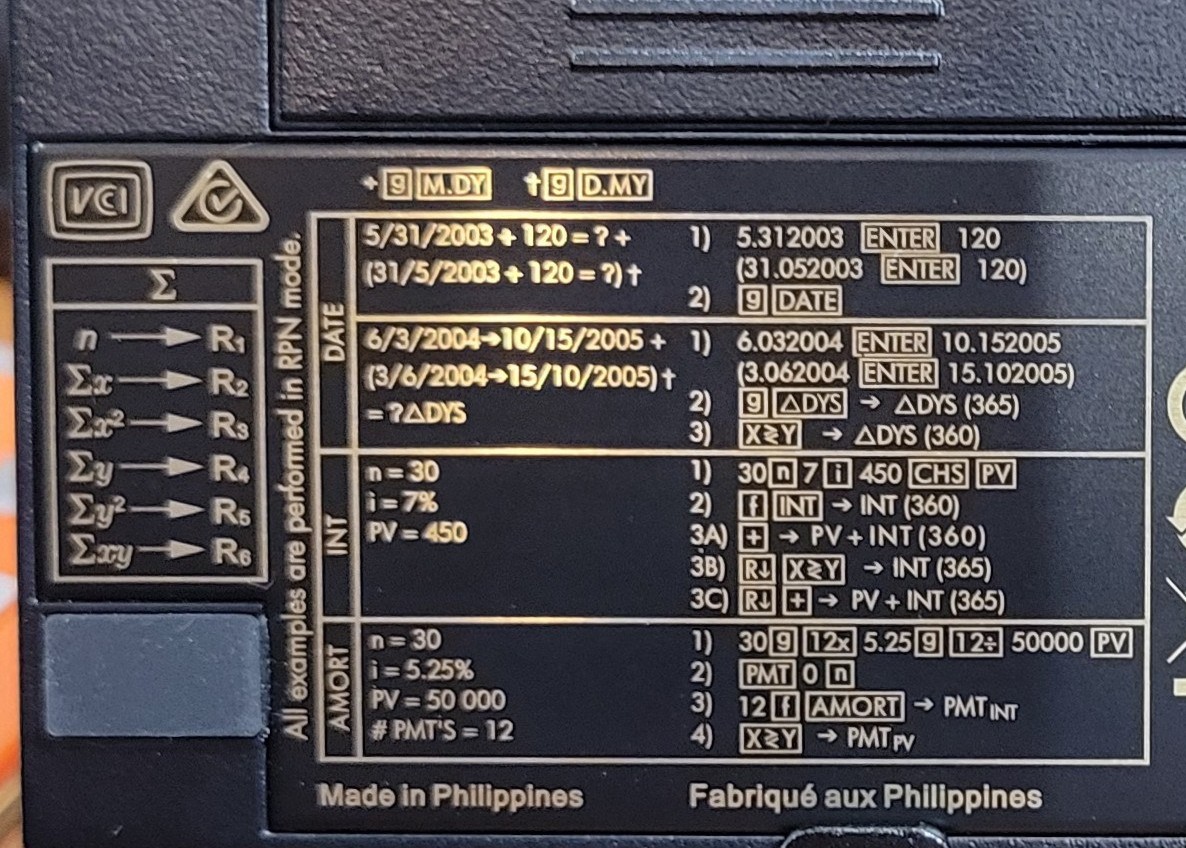
A date 120 days on. 5.312003 [ENTER] 120 g [DATE] → 9,28,2003 7: Sunday 28 September 2003.
Days between two dates. 6.032004 [ENTER] 10.152005 g [ΔDYS] → 499.00 actual days; x≷y → 492.00 on a 360-day year. (HP’s guide uses 14 October and gets 498 and 491.)
Simple interest. 30 [n] 7 [i] 450 [CHS] [PV] f [INT] → 2.63 on a 360-day year; then one of the label’s three alternatives, each straight after f INT: + → 452.63; or R↓ x≷y → 2.59 on a 365-day year; or R↓ + → 452.59. Done one after another, the stack will have moved and the later ones go wrong.
Amortization. 30 g [12×] 5.25 g [12÷] 50000 [PV] [PMT] → −276.10; 0 [n] 12 f [AMORT] → −2,608.19, the first year’s interest; x≷y → −705.03, the first year’s principal; RCL PV → 49,294.97. The principal comes to 705.03, not the 705.01 that the rounded payment would suggest, because the 12C keeps the payment to ten digits unless f RND is pressed.
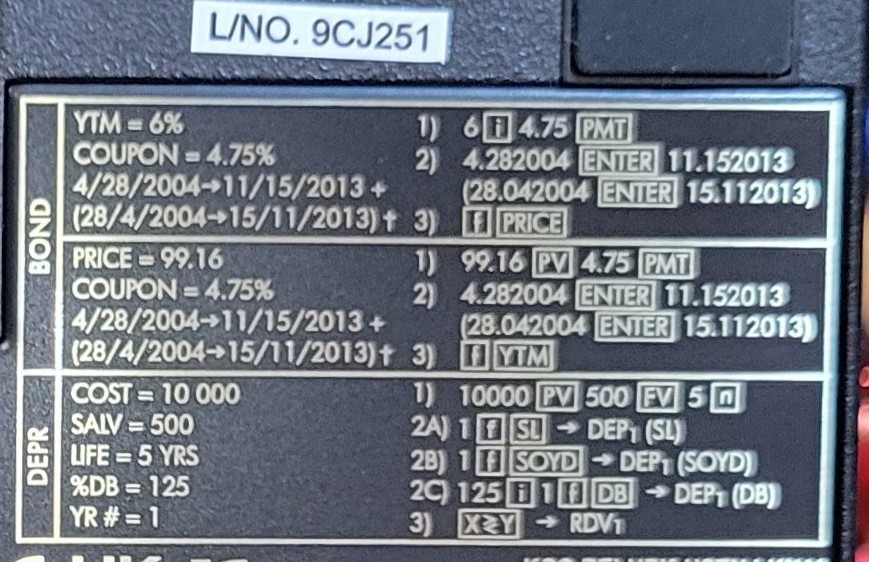
Bond price. 6 [i] 4.75 [PMT] 4.282004 [ENTER] 11.152013 f [PRICE] → 91.01; x≷y → 2.15 accrued; + → 93.17.
Bond yield. 99.16 [PV] 4.75 [PMT] 4.282004 [ENTER] 11.152013 f [YTM] → 4.86 per cent.
Depreciation. 10000 [PV] 500 [FV] 5 [n], then 1 f [SL] → 1,900.00; or 1 f [SOYD] → 3,166.67; or 125 [i] 1 f [DB] → 2,500.00, and x≷y → 7,000.00 still to depreciate.
6.13 Errors and checks
The 12C reports trouble with numbered errors (Appendix C, pp. 181–184): Error 0 for impossible arithmetic such as dividing by zero; Error 3 when IRR needs a guess; Error 5 for financial inputs with no solution, such as cash flows all of one sign; Error 7 when there is no IRR; Error 8 for impossible dates; Error 9 for a failed self-test; and Pr Error after the memory has been lost. Any key clears the message.
Three self-tests are built in (pp. 194–195): hold ON and press × for a full test that ends in −8,8,8,8,8,8,8,8,8,8 with every indicator lit; ON and + repeats it until a key is pressed; ON and ÷ tests the keyboard, every key pressed in order, ending in 12. Holding − while pressing ON clears the memory completely.
Sources
- HP, HP 12c financial calculator user’s guide, Edition 5 (April 2008), part 0012C-90001: pp. 16–82, 181–184, 194–195; formulas in Appendix D.
- HP, HP-12C Owner’s Handbook and Problem-Solving Guide, Edition 2 (1992), and Quick Start Guide (2008), for comparison.
- The back-label results are my own calculations with HP’s formulas, which reproduce the guide’s printed answers for the corresponding examples exactly.
Comments (0)